ERP Change Management Guide: Managing the Human Side of Implementation
Dylan Coetzee · ERP Solution Architect & Founder · 14 min read · May 2026
Quick answer: ERP change management is the sustained, deliberate programme that turns a technically live system into one the organisation actually uses. It begins at project announcement — not go-live — and continues 12–18 months after. The non-negotiables are visible executive sponsorship, a properly resourced super user network, role-specific repeated training, an honest hypercare window, and measurement of adoption through usage data. Done badly, change management is the reason ERP implementations quietly fail.
Here is something most ERP vendors will not tell you: the technology is almost never the reason an implementation fails.
The system works. The configuration is complete. The data migrated. The training happened. The business goes live — and then, gradually, the system stops being used the way it was designed. Staff revert to spreadsheets. Workarounds accumulate. The reports don't match what people expect. Six months after go-live, the expensive new ERP is producing results that feel worse than the system it replaced.
The technology didn't fail. The ERP change management did.
ERP change management is not a training programme. It's not a communication email from the CEO. It's not a go-live party. It is a sustained, deliberate programme of managing how people in the business understand, accept, and embed a fundamentally new way of working. Done well, it is the difference between a system that delivers the value it was purchased for and one that becomes a cautionary tale at the next industry conference.
Before you get to change management, confirm the business is ready for the implementation itself. The ERP Readiness Assessment covers the organisational factors that determine whether an implementation is likely to succeed — including whether internal resourcing and leadership conditions are in place.
Why People Resist ERP Change (And It's Not What You Think)
The instinctive explanation for user resistance is that people don't like change. That's too simple — and it misdiagnoses the problem in a way that produces the wrong interventions.
People resist ERP change for specific, understandable reasons.
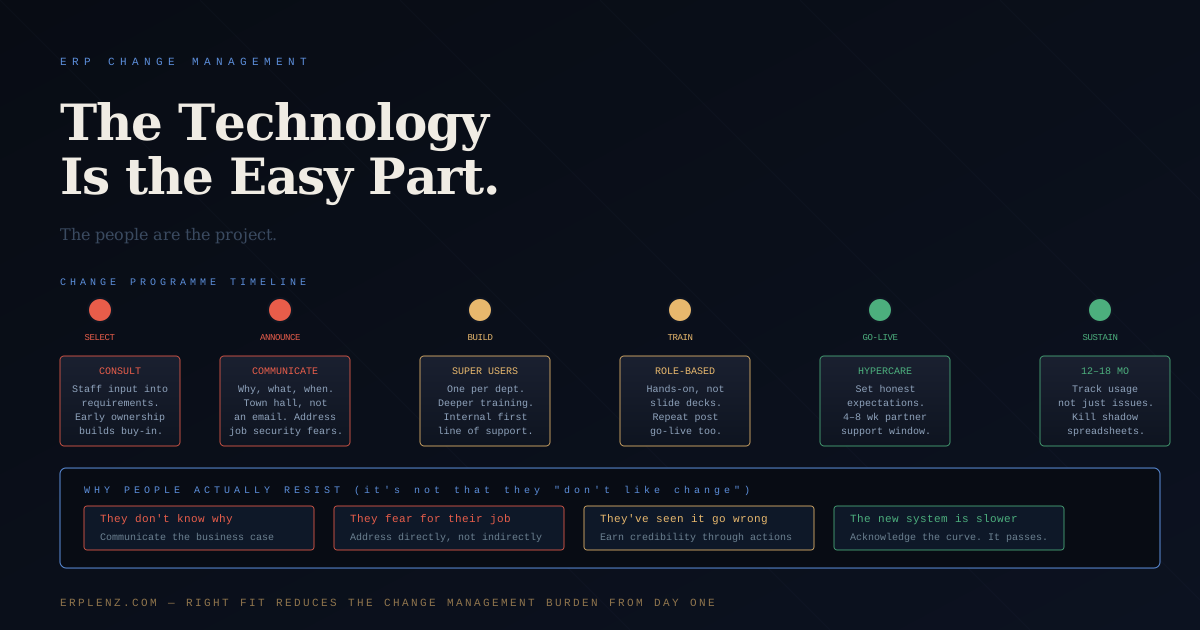
They don't understand why it's happening. A system change announced as "we're implementing a new ERP" without context gives staff nothing to work with. If the business reason isn't communicated clearly — the operational problems the current system cannot solve, the growth the business cannot achieve without better infrastructure — people fill the vacuum with their own interpretations. Those interpretations are rarely favourable.
They're worried about their job. Automation and efficiency improvements are core ERP selling points. From a staff perspective they are also a signal that their function might be at risk. This fear is rarely voiced openly. It expresses itself as foot-dragging, slow adoption, and persistent attachment to old processes that conveniently can't be done in the new system.
They've been through a system change before that went badly. Institutional memory is long. If the previous ERP rollout five years ago was a disaster — bad data, slow system, six months of chaos — that experience shapes how every subsequent change is received. Scepticism is the rational response to a track record of poor delivery. The patterns behind that scepticism are catalogued in why ERP implementations fail.
The new system makes their job harder at first. This is simply true. An experienced user who has used the old system for eight years will be slower on the new one for the first three months, regardless of how good the new system is. That period of reduced productivity feels like evidence the new system is worse. It isn't — it's the learning curve. But it needs to be acknowledged, not denied.
Start Before the Project Does
Most organisations begin change management at go-live. The system is ready, training is scheduled, a communication goes out announcing the launch date.
This is six months too late.
The change programme should begin the moment the implementation project is announced — ideally earlier, during selection. Staff consulted during requirements gathering feel ownership of the outcome. Staff excluded from selection who arrive on day one of training to learn a system they had no input into feel managed, not engaged.
The first communication matters disproportionately. How the project is introduced sets the tone for everything that follows. It should answer: why are we doing this, what problem does it solve, what does it mean for each team, what will change and what won't, and when will people be consulted. A one-paragraph email announcing a go-live date does none of this.
International and multi-region rollouts need this even earlier. Regional teams in the UK, EU, Australia, India, GCC, and LATAM each have local tax, payroll, banking (SEPA, ACH, Faster Payments, NPP, UPI, PIX), and operational nuances that need to be heard before configuration starts. A change programme that treats one region as the template and the rest as variants creates resentment that lasts well past go-live.
The Super User Model
The most effective change management structure for an ERP implementation is the super user model — and it is consistently underinvested in.
Super users are staff from each affected department who receive deeper training than their colleagues — not just how to use the system, but why it works the way it does, how data flows between modules, and how to diagnose common issues. They become the first point of contact for their department after go-live, handling the questions and anxieties that would otherwise overwhelm the implementation partner's support line.
This structure does several things at once. It distributes the knowledge burden so it doesn't sit entirely with the implementation team. It creates internal advocates who speak the language of their own department — a warehouse super user explaining the new pick-and-pack flow to a colleague is more credible than a consultant doing the same thing. And it builds a layer of ERP expertise inside the organisation that outlasts the project.
How to select super users: Choose people who are respected by their colleagues, technically capable, and genuinely curious about how things work. Do not default to the people easiest to release from their day jobs. A disengaged super user who was assigned the role creates more problems than they solve.
What super users need: Dedicated time for deeper training — typically 3–5 days beyond standard user training. Access to a test environment to practise without consequences. Clear accountability for their department's adoption and a direct line to the project team when issues arise.
For Mid-Market businesses (75–500 employees, USD 10M–100M revenue), plan one super user per 25–40 end users in major functional areas — finance, sales, operations, warehouse, manufacturing. Small Business deployments (10–75 employees) can run with two or three super users covering all functions.
Training That Works
Standard ERP training is designed to cover the most ground in the least time. It introduces every module to every user and declares them trained. This produces users who have been exposed to the system but cannot confidently operate it.
Effective training is role-specific, hands-on, repeated, and documented.
Role-specific: A warehouse picker does not need to understand how management accounts are generated. A finance manager does not need to know how to process a goods receipt. Training should be scoped to the exact workflows each person will perform — nothing more, nothing less.
Hands-on: Watching a consultant navigate the system on a shared screen is not training. Users need to perform the transactions themselves, in a test environment that mirrors production, with realistic data reflecting their actual work. Muscle memory develops through repetition, not observation.
Repeated: One session before go-live is not enough. A follow-up session two weeks after go-live — when users have encountered the system under real conditions and have specific questions — is often more valuable than the pre-go-live training.
Documented: Every role should have a simple, step-by-step process guide for their most common tasks. Not a 200-page system manual — a one- or two-page reference for the specific transactions that person performs every day.
The Go-Live Window
The 4–8 weeks immediately after go-live are the highest-risk period in the entire project. The implementation partner's intensive support is winding down. Users are operating the system under real trading pressure for the first time. Edge cases are surfacing that weren't covered in testing.
This period must be planned, not just survived.
Set expectations honestly. Tell management, and tell staff, that the first month on a new system is slower than the last month on the old one. This is normal. It is not evidence the system is wrong. Productivity will recover — and when it does, it will exceed the old system's ceiling.
Keep the implementation partner close. Hypercare should be formally contracted — typically 4–8 weeks of elevated support availability. The problems that surface in week two of live trading are not the ones from UAT. They're the edge cases and volume-related issues that only appear under real load.
Track system usage, not just complaints. Adoption is visible in data. How many users log in daily? How many transactions are being processed through the system versus handled outside it? Which modules are underused relative to design? Usage data tells you where adoption is stalling before it becomes a formal problem. The link from adoption to value is covered in how to measure ERP success and ROI.
The Role of Leadership
Change management programmes fail when leadership treats the ERP as an IT project and steps back from the human side.
People take cues from what leaders do, not what they say. A CEO who references the new system in leadership meetings, demonstrates that decisions are being made using the new reports, and visibly engages with the change rather than delegating it — that posture cascades. Teams follow where leadership leads.
Conversely, a leadership team that approved the budget and then disengaged creates a vacuum that resistant staff fill with their own narrative. If senior leaders aren't using the system, why should anyone else?
The most effective executive sponsors do not just remove obstacles and chair steering committees. They model the change. They ask questions in meetings that can only be answered using the new system. They are visibly invested in the outcome — not just the budget and timeline, but the adoption.
ERP Change Management Milestones
| Phase | Window | Adoption goal | Leading indicators |
|---|---|---|---|
| Pre-project | Selection → kickoff | Stakeholders engaged, business case understood | Survey results, requirements participation |
| Build | Kickoff → UAT | Super users trained, communications cadence established | Training attendance, super user readiness |
| Go-live | Cutover → 4 weeks | Basic operational competence | Daily login rate, transaction volume vs forecast |
| Hypercare | Weeks 4–12 | Issue volume declining, workarounds disappearing | Ticket count, super user escalation rate |
| Stabilisation | Months 3–9 | Process optimisation, reports used for decisions | Report usage, spreadsheet decline |
| Embedded | Months 9–18 | System ownership, ROI realised | Module utilisation, KPI movement |
After Go-Live: The Long Tail
Change management doesn't end when the system goes live. It ends when the business is genuinely operating at the new standard — and that typically takes 12 to 18 months, not 4 weeks.
Milestones to track:
- Months 1–3: Basic operational competence. Staff can perform core daily tasks without regular support.
- Months 4–9: Process optimisation. Teams identify ways to use the system better, not just use it. Reports are used for decisions, not produced for compliance.
- Months 10–18: System ownership. The ERP is the system of record. Spreadsheet workarounds have been eliminated. The super users have become the permanent internal ERP capability.
Businesses that declare victory at go-live and reallocate the change management budget to the next initiative typically see adoption plateau below the system's potential. The ones that sustain the programme through the full adoption cycle realise the ROI they projected.
Frequently Asked Questions
What is ERP change management?
ERP change management is the structured programme that prepares an organisation for a new system, supports adoption during rollout, and embeds new ways of working after go-live. It covers communications, stakeholder engagement, training, super user networks, leadership modelling, and post-go-live adoption tracking. It is distinct from project management (which controls scope, time, and cost of the build) and is the single most reliable predictor of whether an implementation delivers the business case.
When should ERP change management start?
At project announcement — ideally during selection. Staff consulted during requirements gathering arrive at training already understanding why the change is happening. Change programmes that begin at go-live are too late: by then the organisation has spent months filling the information vacuum with its own assumptions, and those assumptions are usually defensive. The first all-hands communication about the project sets the tone for everything that follows.
Who should own ERP change management?
A named change lead with senior backing — sometimes a dedicated change manager on Upper Mid-Market and Enterprise projects, sometimes a senior HR or operations leader on Mid-Market deployments. Crucially, the role is not the project manager and not the IT lead. Change management has different rhythms, different stakeholders, and different success metrics. The change lead reports to the executive sponsor and is empowered to escalate adoption risks independently of project status.
What is a super user in ERP implementation?
A super user is a staff member from a functional area — finance, sales, operations, warehouse, manufacturing — who receives deeper training than their colleagues and becomes the local point of expertise during and after rollout. Super users handle first-line questions, run refresher training, escalate issues, and embody the change in their department. Plan one super user per 25–40 end users in Mid-Market deployments. Selection matters: choose respected, curious people, not the easiest to release.
How long does ERP adoption take after go-live?
12–18 months for full adoption in most Mid-Market and Upper Mid-Market deployments. The first 4–8 weeks are hypercare — staff stabilise on basic transactions. Months 3–9 are process optimisation — teams identify how to use the system better, not just operate it. Months 10–18 are when the system becomes the genuine system of record and spreadsheet workarounds disappear. Businesses that withdraw change support at go-live typically plateau at 60–70 percent of the system's potential.
How much should we budget for ERP change management?
A common benchmark from Panorama Consulting and Gartner research is 10–15 percent of total implementation cost. For a Mid-Market project with USD 800K–2M of implementation services, that means USD 80K–300K dedicated to change management, training, and adoption support. Businesses that underspend here routinely overspend on post-go-live support and rework. The full cost picture is in how much does ERP cost.
How do we measure ERP adoption?
Through usage data, not surveys alone. Daily active users by module. Transaction volume processed through the system versus handled in spreadsheets. Report run frequency. Time to close. Error and exception rates. Super user escalation patterns. Ticket volume to the partner's support line. Adoption surveys can supplement these but should never substitute for them. Self-reported confidence rarely matches actual system behaviour.
Why do ERP training programmes fail?
They are usually too generic, too compressed, too early, and too one-shot. Training delivered as a single pre-go-live event, covering every module for every user with vendor-supplied generic content, produces exposure rather than capability. Effective programmes are role-specific, hands-on in a realistic test environment, repeated at intervals (pre-go-live and two weeks post), and supported by short reference guides for each role's most common tasks.
How ERPLenz Supports Change Readiness
Platform fit is the foundation of change management. A system that matches how your business actually works requires less behaviour change from users — workflows are familiar, logic makes sense, training is shorter, resistance is lower.
A system that requires users to adapt to the software, rather than the software adapting to the business, creates change management problems that no amount of communication or training can fully resolve. Platform selection and partner selection matter together: a well-matched platform delivered by a partner who knows how to manage the change programme gives your project the best chance of full adoption.
ERPLenz scores 17 ERP platforms against your specific operational profile — industry, workflows, team structure, process complexity, and regional footprint. Budget is applied as a hard filter: platforms that exceed what you can realistically afford to implement properly are eliminated before they reach your shortlist. Partner recommendations identify implementation teams in your region with documented delivery experience, so you can evaluate their change management approach alongside their technical credentials. The questions included for each shortlisted vendor cover implementation methodology and post-go-live support — so you can assess whether their delivery model includes the change management infrastructure your project needs.
The right fit makes the change easier. Start with fit.
Adoption is where ERP value lives — or quietly dies. ERPLenz's job is to make sure the platform you pick has a fighting chance of being used the way the business case promised.
If you're earlier in the process
- When does a business need ERP?
- Which ERP is right for my business?
- How much does ERP actually cost?
- Check your ERP readiness →
On implementation