How to Choose an ERP in 2026: The No-Nonsense Selection Playbook
Quick answer: To choose an ERP in 2026, document your requirements before talking to a single vendor, build a shortlist of three to four platforms that genuinely fit your tier and industry, run scripted demos against your real processes, model five-year total cost of ownership (not just licence pricing), and validate with reference customers of your size. Skip any of these and you are buying on sales theatre, not fit.
Most ERP selection processes are broken before the first demo is booked. A business outgrows its accounting stack, somebody pulls up a vendor recommended at a conference, and six months later there is a signed five-year contract for a platform that does not fit. The problem is not ignorance. It is asymmetry. Vendor sales teams have run this play hundreds of times. You are a first-time buyer making a decision that will define your operational pain for the next decade.
This playbook is about correcting the asymmetry. It applies whether you are buying for a 60-person UK manufacturer, a 250-person Australian distributor, a 400-person Saudi services group, or a 900-person German engineering firm. The tactics translate. The tiers translate. The traps translate.
Step 1 — Define requirements before you talk to anyone
The single most valuable thing you can do before any vendor contact is to write your requirements down. Not a wish list — a structured breakdown of business processes, the gaps in your current system, and the non-negotiables for the next one.
Organise the requirements into categories:
- Finance — multi-entity, consolidation, intercompany, reporting standards (IFRS, US GAAP, AASB, local GAAPs)
- Tax and statutory — UK MTD, EU VAT (including OSS/IOSS), US sales tax (Avalara, Vertex), AU GST, India GST, ZATCA e-invoicing, UAE VAT, SAF-T
- Operations — inventory, manufacturing (MRP/MES), purchasing, warehousing, fulfilment
- Sales and revenue — CRM, order management, pricing rules, commissions, revenue recognition (ASC 606 / IFRS 15)
- HR and payroll — headcount, localised payroll, leave, statutory filings
- Banking and payments — SEPA, Faster Payments, ACH, BACS, NPP, UPI, SWIFT
- Integration — e-commerce, 3PL, WMS, BI, EDI, industry-specific systems
- Technical — cloud vs on-premises, data residency, IT capacity for self-hosting
For each requirement, assign Must Have, Should Have, or Nice to Have. Be ruthless. If everything is a Must Have, you have no scorecard — you have a wish list, and you will eliminate capable platforms for no good reason.
For the deeper rationale on why this step alone defines the rest of the project, see how to select an ERP system.
Step 2 — Calibrate to your tier honestly
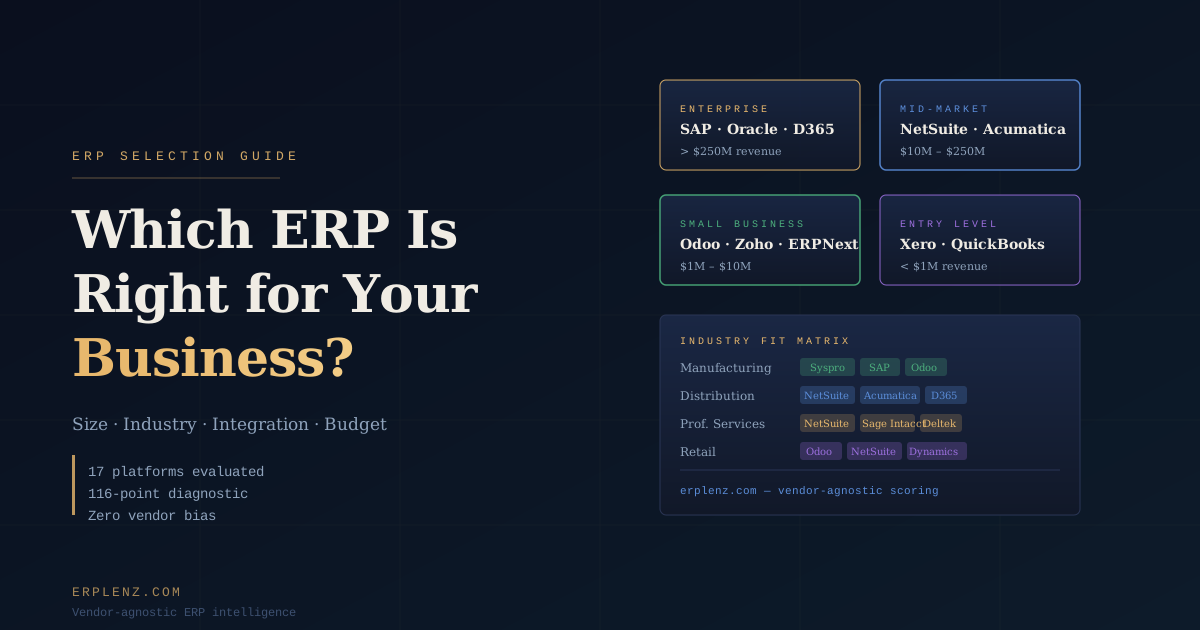
Most failed selections happen at the tier line. A 40-person services firm chasing NetSuite. A 600-person manufacturer trying to scale Xero. Both end badly. Use the standardised tiers below as your sanity check before any vendor enters the room.
| Tier | Headcount | Revenue (USD) | Typical platforms |
|---|---|---|---|
| Micro Business | <10 | <$1M | Xero, QuickBooks Online, Zoho Books |
| Small Business | 10–75 | $1M–$10M | Odoo, ERPNext, Zoho One |
| Mid-Market | 75–500 | $10M–$100M | NetSuite, Microsoft Dynamics 365 Business Central, Acumatica, Sage Intacct, Syspro, SAP Business One |
| Upper Mid-Market / Enterprise | 500+ | >$100M | SAP S/4HANA, Oracle Fusion Cloud ERP, Microsoft Dynamics 365 F&O, JD Edwards, Infor CloudSuite |
Industry weight then adjusts the list. A 200-person discrete manufacturer with strong shop-floor needs will weight toward Syspro, SAP Business One, Acumatica Manufacturing, or DELMIAworks (formerly IQMS). A 200-person distributor weights toward NetSuite, Acumatica, or Business Central. A 200-person professional-services group with revenue recognition complexity weights toward NetSuite, Sage Intacct, or Kantata (formerly Mavenlink). Same headcount; different shortlists.
Step 3 — Model the real total cost of ownership
The price a vendor quotes you in a first call is almost never the price you pay. Panorama Consulting's annual ERP research consistently shows mid-market implementations running 30–55% over the originally budgeted figure. Most of that overrun was knowable up front.
Three components matter:
- Licence / subscription cost — the most visible and the most discountable, which makes it the least reliable line in your evaluation
- Implementation cost — typically 1–3× first-year licence for mid-market platforms, 3–5× for upper mid-market, and 5–8× for SAP S/4HANA or Oracle Fusion-class projects
- Ongoing cost — annual support, sandbox environments, internal IT, integration maintenance, and the slow tax of workarounds when the system does not quite fit
A useful sanity check: budget first-year licence × 3 as your Year 1 spend, and licence × 5 as your five-year run-rate. If those numbers are unacceptable, fix the shortlist before you get emotionally committed. For a complete cost breakdown by tier and deployment model, see how much does ERP cost.
Step 4 — Build a shortlist of three to four vendors, not eight
Evaluating eight platforms in parallel is not thorough — it is paralysing. The vendors know this. A long evaluation exhausts your internal team and the winner is the vendor with the best sales process, not the best product.
A well-built shortlist has three to four genuine candidates. As a starting point, by profile:
| Profile | Plausible shortlist |
|---|---|
| Small Business services firm | Xero + integrations, Zoho One, Odoo |
| Small Business manufacturer | Odoo, ERPNext, SAP Business One |
| Mid-Market distributor | NetSuite, Acumatica, Dynamics 365 Business Central |
| Mid-Market manufacturer | Syspro, Acumatica, SAP Business One, Business Central |
| Upper Mid-Market global group | SAP S/4HANA, Oracle Fusion Cloud ERP, Dynamics 365 F&O |
These are starting positions, not verdicts. Geography, language coverage, partner ecosystem, and industry depth will move the list. If you are torn between a horizontal giant and a vertical specialist, major ERP vendor vs niche ERP walks through the trade-off properly.
Step 5 — Run a structured demo, not a vendor showcase
A vendor-led demo will show the system at its best. Your job is to see it under pressure.
Before each demo, send a demo script — specific scenarios drawn from your requirements document. Ask the vendor to run each scenario live in their system, not in a pre-built slide deck. Include the edge cases: the unusual process that breaks your current system, the integration you cannot live without, the month-end report your finance team actually runs.
During the demo, watch for:
- Workarounds. "We would handle that with a custom field and a saved search" is a gap, not a feature.
- Context-switching. If the consultant jumps modules, exports to Excel, or opens a second tool to complete a flow, mark it.
- Version disclaimers. "That is on the roadmap" means it does not exist today.
- Persona realism. Ask to see the screen your warehouse picker, AP clerk, or project manager will actually use — not just the CFO dashboard.
Score every demo against your scorecard the same day. Not a week later, after the vendor has followed up three times and your impression has been quietly reshaped.
Step 6 — Check references that match your profile
Every vendor will provide references. Every reference will be a customer who has agreed to talk. That alone is not useful.
Ask for references that match your specific profile: same industry, similar headcount, similar geography, similar complexity. Then ask questions the vendor did not coach them on:
- What went wrong during implementation, and how was it resolved?
- What does the system not do well that you wish you had known before signing?
- How responsive is support when you have a critical issue at month-end close?
- Knowing what you know now, would you choose the same vendor and the same partner again?
If a vendor cannot produce a matching reference, ask why. Often the honest answer is that you would be the largest, smallest, or most unusual customer they have onboarded in your region.
Step 7 — Negotiate the contract, not just the price
Most ERP negotiations focus on the licence line. The more important terms live elsewhere.
- Implementation scope. Define deliverables, not just hours. A scope priced in hours will overrun; a scope priced in outcomes has accountability.
- Data ownership. Confirm in writing your right to export all your data at any time, in a portable format, at no extra cost.
- Price escalation. Uncapped 7–10% annual SaaS uplifts compound viciously. Negotiate a cap (CPI + a small margin is reasonable).
- Go-live definition. Without contractual go-live criteria, a vendor can declare go-live before you are ready and start the support clock early.
- Exit provisions. Data migration assistance, transition support, and off-boarding terms matter more than you think the day you sign.
- Partner clause. If the vendor sells through partners, name the specific implementation partner and the named consultants in the SOW. Replacing the lead consultant mid-project is one of the most common silent failure modes.
For the partner-versus-vendor-direct trade-off, see ERP implementation partner vs vendor direct.
The questions most businesses forget to ask
What happens to my data if the vendor is acquired or goes under? Mid-market ERP is a consolidating industry. Sage, Infor, and Epicor have all rolled up smaller platforms in the last decade. Your vendor today may be a different company in three years.
Who actually implements this — the vendor or a partner? Most mid-market ERP is delivered by partners. The quality of your implementation depends almost entirely on the specific partner and named consultant, not the vendor brand on the website.
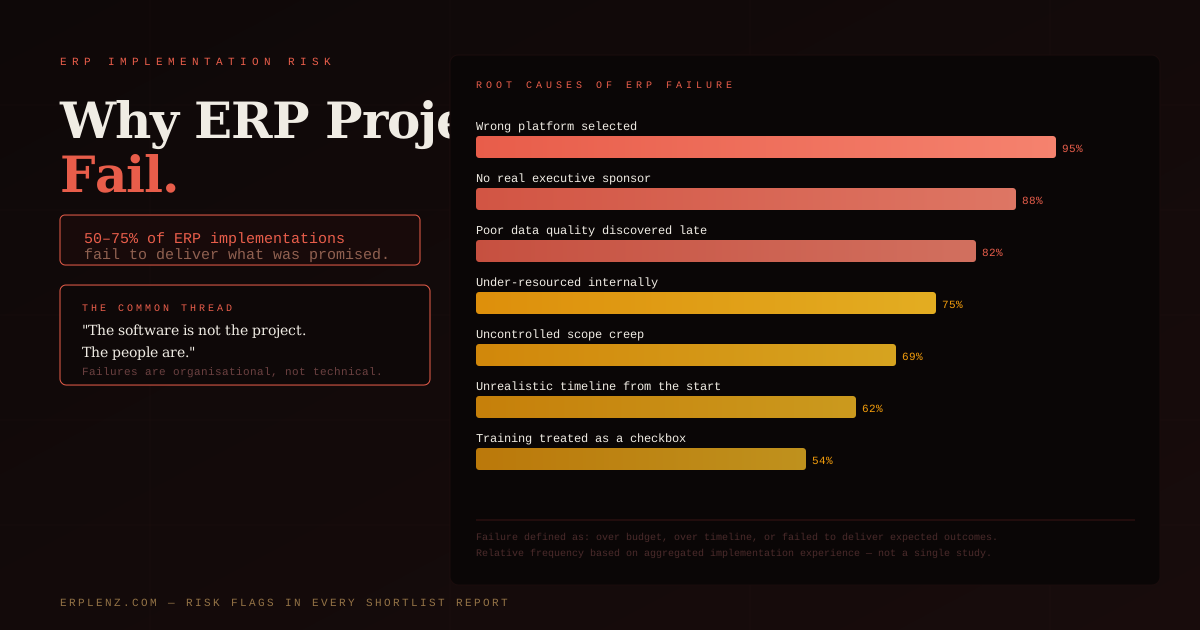
What does the UI look like for my warehouse staff, not just the CFO? Adoption failure is the most common cause of ERP project failure. A system your team refuses to use is worse than the spreadsheets it replaces. The companion to this is good change management — the part of an ERP project that is consistently under-resourced.
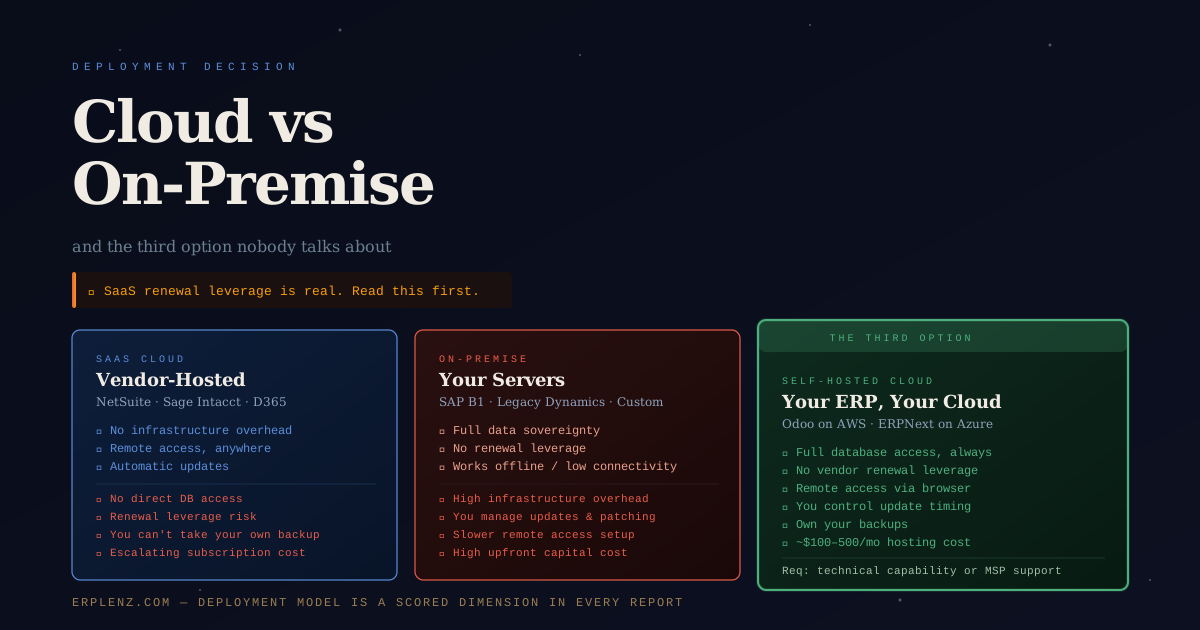
Cloud, on-premises, or self-hosted? This is not a binary. Read cloud vs on-premise ERP before the vendor frames the answer for you.
A note on objectivity
The ERP industry runs on relationships, referrals, and margin. Analyst rankings are often sponsored. Implementation partners earn more from larger, more complex builds. Even well-intentioned advice carries bias.
The most reliable evaluation is one built on your own documented requirements, scored against live demonstrations, validated by reference customers with matching profiles, and stress-tested with a five-year TCO model that includes the lines the vendor would prefer you ignored.
Frequently Asked Questions
How long should it take to choose an ERP in 2026?
For a mid-market business, expect four to nine months from kicking off requirements work to signed contract. Micro and Small Business selections can run in six to twelve weeks if requirements are tight. Upper mid-market and enterprise selections routinely take twelve to eighteen months. If a vendor is pushing you to sign in under sixty days, that is a sales motion, not a fit signal.
How many vendors should be on the shortlist?
Three to four. Two creates no real competitive tension. Five or more exhausts your internal team and biases the result toward whichever vendor runs the slickest sales process. The shortlist is the most important artefact of the entire selection — it is where fit is decided, before a demo has even run.
How much does ERP really cost in 2026?
For mid-market deployments, expect $4,000–$15,000 USD per user over five years all-in (licence, implementation, support, integration, infrastructure). Upper mid-market and S/4HANA-class deployments routinely exceed $25,000 per user. Headline subscription pricing is roughly one-third of the true five-year run-rate. The full breakdown is in how much does ERP cost.
Should I issue a formal RFP?
Only if you are required to (public sector, regulated industries) or you are seriously evaluating four or more upper-mid-market vendors. For most mid-market selections, a scripted demo plus a structured requirements document does more work in less time than a 120-page RFP that nobody reads carefully.
Cloud or on-premises in 2026?
Default to cloud unless you have specific data sovereignty, latency, or customisation constraints. The third option — self-hosting an open-source ERP on your own cloud infrastructure — is also viable for technically capable Small Business and lower-Mid-Market organisations. The full trade-off is in cloud vs on-premise ERP.
How do I know we are even ready to start an ERP project?
Common readiness signals: month-end takes more than ten working days, you cannot get a consolidated view across entities, inventory accuracy is under 95%, you are running operations from spreadsheets, or you are about to outgrow your current platform's licensing tier. For a structured readiness check, see when does a business need ERP.
What is the single biggest mistake to avoid?
Talking to vendors before you have written down your requirements. Every demo you sit through without a requirements baseline rewires your sense of what "good" looks like — using the vendor's platform as the answer. Requirements first, vendors second. Always.
Who should own the ERP selection internally?
A small steering committee: an executive sponsor (CEO or COO), Finance, Operations, and IT — with a dedicated internal project owner who treats the selection as their primary job. Part-time ownership is the most common reason selections drift, momentum dies, and the eventual decision is made under deadline pressure.
ERPLenz is built by ERP architects who have implemented these platforms first-hand. No vendor pays for placement, no analyst ranking shapes the scoring — your shortlist is driven by fit, full stop.