How to Select an ERP System: A Vendor-Agnostic Guide for 2026
Quick answer: A rigorous ERP selection runs through five phases — needs analysis, market scan, scripted demos and shortlisting, five-year total cost of ownership modelling, and reference checks plus contract negotiation. End-to-end it takes four to nine months and 200–600 hours of internal effort for a mid-market business. Skip phases and you do not save time — you push the cost into a failed implementation.
Selecting an ERP system is one of the most consequential technology decisions a business will ever make. Done well, it aligns operations, consolidates data, and creates a decade-long platform for scalable growth. Done badly, it consumes two to four times the expected budget, fractures team morale, and locks you into a system that fights your workflows for the next eight years.
The uncomfortable truth is that most ERP failures are selection failures, not implementation failures. The wrong platform, poorly scoped and chosen for the wrong reasons, cannot be rescued by the best implementation team on earth. You set the trajectory the moment you draw up your shortlist.
This guide documents every meaningful phase of a rigorous ERP selection — from understanding your own requirements to evaluating vendors, running proof-of-concepts, and negotiating contracts. It is written for finance, operations, and IT leaders in mid-market organisations across the UK, EU, US, Australia, India, GCC, and LATAM. The mechanics are the same; the regulatory furniture differs, and we flag where it matters.
Why ERP selection is harder than it looks
The global ERP market is worth over US$65 billion annually and growing. Gartner, Panorama Consulting, and ISG all track more than 200 credible vendors globally, ranging from vertical specialists serving narrow industries to horizontal giants like SAP, Oracle, and Microsoft targeting the full spectrum. Beneath each vendor brand sit multiple product lines, deployment models, pricing structures, and partner ecosystems.
For a finance director or operations leader who does not live in this market, it is deliberately opaque. Vendor sales teams are incentivised to create urgency, obscure total cost, and match you to their platform regardless of fit. Analyst reports are useful but expensive and often generalised. Implementation partners have financial ties to specific vendors.
The result: most ERP selection processes are under-resourced, vendor-led, and anchored to the first platform that looked good in a demo. Panorama's annual research consistently shows that the leading driver of post-go-live regret is poor fit identified during selection — not implementation execution.
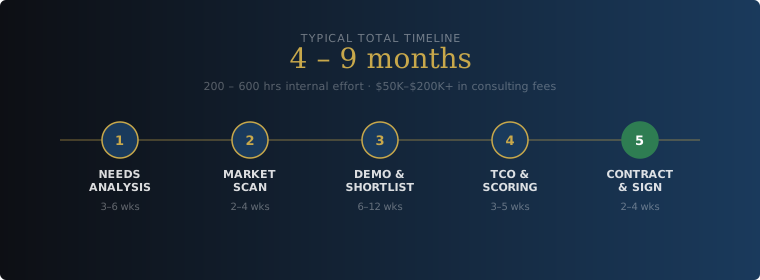
The five phases of ERP selection — and why each one consumes more time than most organisations budget for.
Phase 1 — Needs analysis: know yourself before you evaluate anyone else
The single biggest cause of ERP mismatches is selecting a system before the organisation has articulated what it actually needs. Without a documented requirements baseline, every vendor demo becomes a passive experience where the vendor tells you what you need — using their own platform as the answer.
What a proper needs analysis covers
1. Current system audit. Document every system in use: accounting, CRM, inventory, payroll, custom spreadsheets, everything. Map data flows between them. Identify where manual re-entry, reconciliation errors, and reporting delays occur. This is your pain map — the ERP must resolve these, not replicate them.
2. Process documentation. Walk through your core processes end-to-end: quote-to-cash, procure-to-pay, hire-to-retire, record-to-report, plan-to-produce (if you manufacture). For each, document the current flow, the people involved, and where it breaks. These become your scripted demo scenarios and your UAT framework.
3. Business Requirements Document (BRD). Translate process pain into requirements. Categorise each as Must-Have, Should-Have, or Nice-to-Have. A common mistake is elevating everything to Must-Have — this inflates scope and eliminates capable platforms unnecessarily. Be ruthless.
4. Scale and growth planning. Document current and projected user count, transaction volumes, geographic footprint, and any anticipated M&A. An ERP that fits perfectly today but cannot handle 3× growth without re-implementation is a liability. Design for five years from now.
5. Technical and compliance constraints. Hard constraints first: data residency (UK GDPR, EU GDPR, India DPDP, KSA PDPL, Australia Privacy Act), industry certifications (SOC 2, ISO 27001, HIPAA, ITAR, PCI-DSS), tax e-invoicing mandates (UK MTD, ZATCA, India GST e-invoicing, Italy SDI, Mexico CFDI), and IT capacity. Some constraints eliminate entire deployment models — sovereignty rules can disqualify multi-tenant SaaS entirely.
Realistic effort. A thorough needs analysis takes 40–80 hours of internal effort and three to six weeks elapsed. It needs Finance, Operations, IT, and an executive sponsor. Skipping it is the single most expensive shortcut in ERP selection. The companion piece on when a business genuinely needs ERP is worth running through before you start.
Phase 2 — Market scan: building your longlist
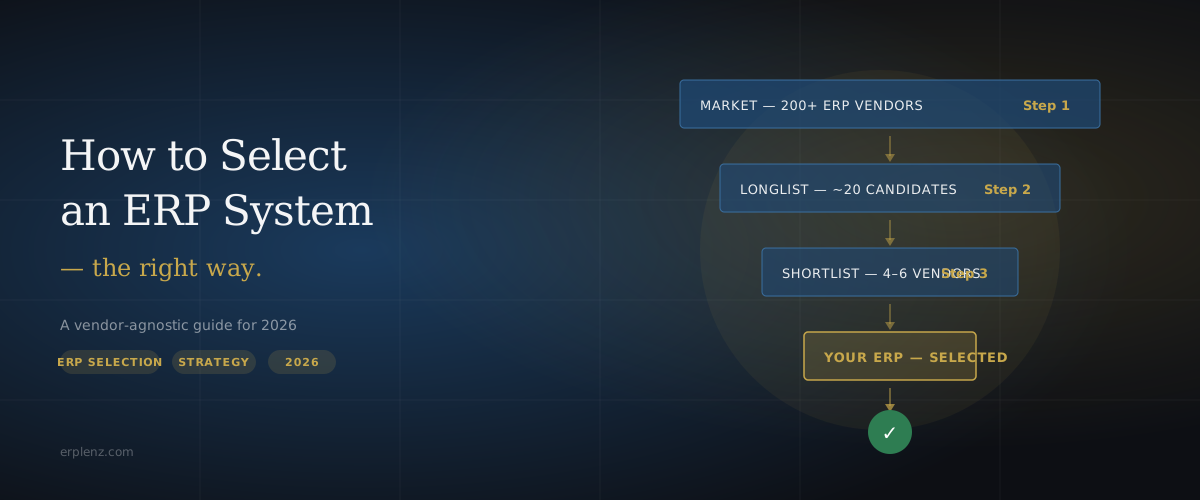
Armed with a clear BRD, the next step is mapping the vendor landscape against your profile. The goal is to move from 200+ potential platforms to a longlist of 10–20 candidates worth deeper evaluation. Use the standardised tier bands below to filter aggressively before you research individual vendors:
| Tier | Headcount | Revenue (USD) | Representative platforms |
|---|---|---|---|
| Micro Business | <10 | <$1M | Xero, QuickBooks Online, Zoho Books |
| Small Business | 10–75 | $1M–$10M | Odoo, ERPNext, Zoho One |
| Mid-Market | 75–500 | $10M–$100M | NetSuite, Microsoft Dynamics 365 Business Central, Acumatica, Sage Intacct, Syspro, SAP Business One |
| Upper Mid-Market / Enterprise | 500+ | >$100M | SAP S/4HANA, Oracle Fusion Cloud ERP, Microsoft Dynamics 365 F&O, JD Edwards, Infor CloudSuite |
Six dimensions for a structured scan
| Dimension | What you are evaluating | Why it matters |
|---|---|---|
| Industry fit | Native vertical functionality vs generic configuration | Industry-specific platforms cut customisation cost significantly |
| Tier alignment | SMB vs Mid-Market vs Enterprise positioning | Platforms built for the wrong tier create support and scalability gaps |
| Deployment model | Cloud SaaS, on-premises, hybrid, self-hosted | Affects compliance, IT overhead, and long-term upgrade cost |
| Functional coverage | Native modules vs reliance on ISV add-ons | Fragmented stacks multiply integration and licensing cost |
| Partner ecosystem | Local implementation partners — depth and quality | Without strong local partners, even great software fails in practice |
| Vendor stability | Ownership, R&D trajectory, market position | ERP vendor consolidation is ongoing — do not bet on a platform that disappears |
Cross-reference each candidate against Gartner Magic Quadrants, Panorama Consulting reports, ISG Provider Lens, G2, Capterra, and active community forums. Each is biased in a different direction — triangulation is the point.
The horizontal-versus-vertical decision deserves its own conversation. If you operate in a regulated or process-heavy industry, read major ERP vendor vs niche ERP before you finalise the longlist.
Phase 3 — Demos and shortlisting
Once you have a longlist, compress it to three to five vendors for detailed evaluation. This is where most ERP processes go wrong: unscripted demos, misaligned audiences, no scoring framework.
Running a scripted demo
Never sit through a vendor's standard product demo. Their demo is designed to show the platform at its best — not to answer your specific questions. Send each vendor the same script and ask them to demonstrate the same workflows in their system.
Your script should cover:
- Core workflow scenarios — three to five end-to-end flows drawn from your documented processes. Same scenarios for every vendor, so comparison is direct.
- Configuration questions — specific requirements that require configuration or customisation. Ask vendors to demonstrate, not describe, how they would handle your edge cases.
- Integration points — your existing stack (payroll, CRM, e-commerce, 3PL, WMS, BI, EDI). Ask for live API or connector demonstrations in a sandbox.
- Reporting scenarios — your three most important management reports built live during the demo. This reveals reporting depth and configuration effort faster than any feature matrix.
- End-user UI — the screen your warehouse picker, AP clerk, or project manager will actually use. Not just the CFO dashboard.
Scoring framework
Assign each vendor a weighted score across your requirements categories. Use the Must-Have / Should-Have / Nice-to-Have classification to set weights. This converts subjective demo impressions into comparable, defensible data — essential when you are presenting to a steering committee or board.
Common mistake. Scheduling demos before the BRD is finalised. Without a baseline, demos become brand experiences, not capability assessments. Vendors are extraordinarily good at demos. Your only protection is structured evaluation criteria applied consistently across all candidates.
Phase 4 — Total cost of ownership modelling
Licence pricing is the tip of the iceberg. For a 50-user mid-market deployment, the first-year licence is rarely the largest cost item. Yet most ERP evaluations anchor on headline per-user pricing and miss the full picture by a factor of three to five.
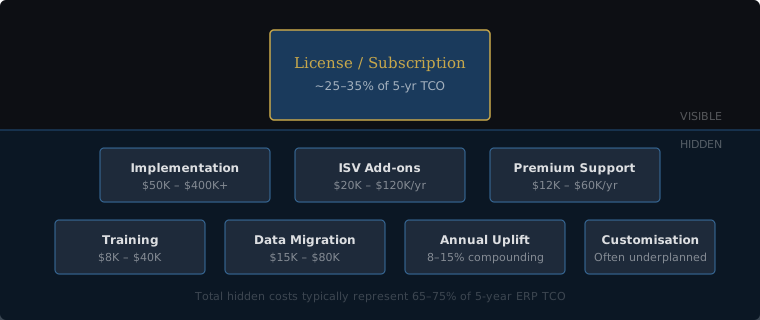
The ERP cost iceberg — licence pricing is visible; most true cost sits below the surface.
Building a realistic 5-year TCO model
For each shortlisted vendor, model these cost buckets across a five-year horizon:
| Cost bucket | What to include | Common mistake |
|---|---|---|
| Licensing | Base platform fee + per-user fees + module add-ons | Ignoring 7–10% annual renewal uplifts compounded over five years |
| Implementation | Partner fees, internal staff time, project management | Using the vendor's "starting from" figure; budget at the P75 estimate |
| Customisation | SuiteScript, AL, ABAP, OCA modules, workflow automation, reporting | Assuming out-of-the-box configuration covers all edge cases |
| Integrations | iPaaS (Boomi, Celigo, Workato, MuleSoft), API development, EDI | Treating each integration as one-time; maintenance is ongoing |
| ISV add-ons | Tax engines (Avalara, Vertex, Sovos), WMS, EDI, HR, BI | Not pricing these until post-contract when gaps emerge |
| Support and training | Premium support tiers, ongoing training for new hires | One-time training budget; ERP requires continuous learning investment |
| Infrastructure | Sandbox environments, storage overages, networking, observability | Assuming infrastructure is included in the SaaS subscription |
For a structured, regional cost breakdown by tier and deployment model, see how much does ERP cost.
Phase 5 — Reference checks, POC, and negotiation
Reference customer calls
Every shortlisted vendor will provide references. These are curated — you will not be connected to a dissatisfied customer. Extract useful signal by asking specific questions: What took longer than expected? What would you do differently? How has the platform performed at renewal? How responsive is support when something breaks at month-end?
Supplement vendor-provided references with your own research: LinkedIn searches for people who have recently left implementations of that platform, ERP community forums (r/ERP, ERPFocus), and Gartner Peer Insights with the vendor filter applied.
Proof of concept
For deployments above US$250K total expected spend, a POC is worth the investment. Take your single most complex or differentiating business process and ask the top two vendors to configure and demonstrate it in a sandboxed environment using your own sample data. A POC reveals configuration effort, customisation requirements, and partner quality in a way no demo can.
Contract negotiation
ERP contracts are far more negotiable than most buyers realise. Real leverage points include:
- Multi-year commitments in exchange for fixed pricing
- Uncapped user growth within tiers
- Sandbox environments at no additional cost
- Defined SLAs with credit clauses
- Contractual caps on annual renewal uplifts (CPI + 2–3% is achievable)
- Named implementation partner and named consultants in the SOW
- Clear data extraction terms and exit provisions
- A contractual definition of "go-live" — without one, the support clock starts when the vendor decides
Never sign the vendor's standard contract without legal and commercial review. For the partner-versus-vendor-direct question, ERP implementation partner vs vendor direct covers the trade-off in depth.
Common selection mistakes — and how to avoid them
| Mistake | What it costs | How to avoid it |
|---|---|---|
| Starting with demos | Platform bias before requirements are clear | Finalise the BRD before the first vendor conversation |
| Single-vendor evaluation | No competitive leverage; no reference point | Always run at least three vendors to final scoring |
| IT-led selection | Technical preferences override business requirements | Finance and Operations must co-own the process |
| Underestimating internal effort | Selection drags, momentum dies, decisions made under deadline pressure | Assign a dedicated internal project owner, not a part-time contributor |
| Ignoring the partner | Great software, terrible implementation | Evaluate partners as rigorously as the platform |
| Cheapest upfront = lowest TCO | Hidden ISV, customisation, and support costs erode savings | Build full 5-year TCO for every shortlisted vendor |
| Excluding end users | Low adoption rates post go-live | Include representative end users in demos and UAT design from the start |
| Underestimating change management | Adoption stalls, ROI evaporates | Budget change management as a first-class workstream |
A decision framework you can use today
If you are at the start of an ERP evaluation and need rapid orientation, answer these seven questions. They will not replace a full selection, but they will immediately clarify which segment of the market deserves your attention.
Q1 — How many users will access the system? Under 25 points to Small Business platforms (Odoo, ERPNext, Zoho One). 25–200 falls into Mid-Market (NetSuite, Business Central, Acumatica, Sage Intacct). Over 200 typically requires Upper Mid-Market or Enterprise platforms (SAP S/4HANA, Oracle Fusion, D365 F&O).
Q2 — Is manufacturing a core operational function? If yes, shortlist platforms with native MRP, BOM management, and shop-floor control (Business Central with manufacturing modules, Syspro, SAP Business One, Acumatica Manufacturing, DELMIAworks). Generic platforms can handle light assembly but need expensive ISV add-ons for serious production environments.
Q3 — Do you operate across multiple entities, currencies, or tax regimes? Multi-entity, multi-currency, and multi-jurisdiction requirements immediately elevate the platform tier. NetSuite OneWorld, SAP, Oracle, and D365 F&O handle this natively. Lower tiers require workarounds that rarely hold up at scale.
Q4 — Are you a Microsoft-centric organisation? If your team lives in Microsoft 365, Teams, and Entra ID, Dynamics 365 Business Central's native integration genuinely reduces training and adoption friction.
Q5 — Do you have hard data sovereignty or on-premises requirements? Certain industries and geographies (defence, healthcare, some GCC and EU public sectors) mandate sovereign or on-premises deployment. This rules out true multi-tenant SaaS. Business Central, SAP, and Infor offer on-premises or sovereign-cloud models. The trade-offs are in cloud vs on-premise ERP.
Q6 — What is your realistic 5-year budget? Calibrate the segment to your budget reality. Upper-Mid-Market platforms with US$1M+ five-year TCO are not appropriate for a 30-person business with a US$200K budget.
Q7 — What is your internal IT capacity? Platforms requiring active customisation in specialised languages (SuiteScript, AL, ABAP) need IT depth to match. Without internal capability, prioritise platforms with strong managed-services ecosystems.
Where ERPLenz changes the equation
Every phase above represents necessary work. But for most mid-market organisations, the combination of internal resource constraints, vendor bias, and market opacity makes executing it rigorously nearly impossible. The result is compressed, shortcut-laden processes that produce matches based on brand recognition rather than structural fit.
ERPLenz was built to close that gap — not by removing due diligence, but by compressing the most time-intensive and expertise-dependent stages.
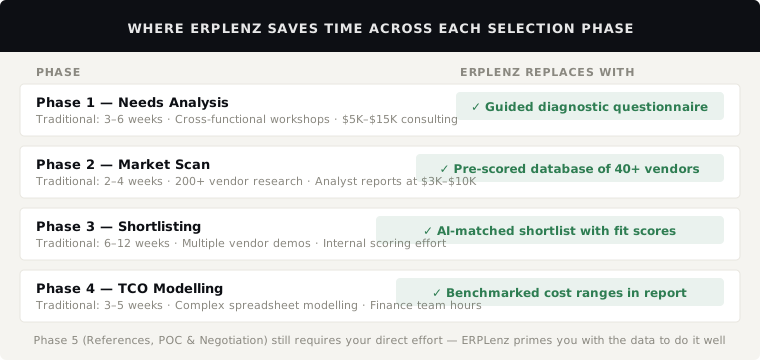
ERPLenz compresses Phases 1–4 into a single 30-minute diagnostic — saving 80–120+ hours of internal research and scoping.
How it works
1. Structured diagnostic. A questionnaire covers industry, tier, current systems, functional requirements, deployment preferences, compliance needs, and budget envelope. Designed by ERP consultants — the same questions a good advisor would charge US$2,000–$5,000 to extract in a workshop.
2. Scored matching. Diagnostic responses are matched against a database of ERP platforms, each scored across dozens of dimensions: functional depth by module, industry suitability, deployment model, tier alignment, partner ecosystem quality, and pricing transparency. Must-Haves carry more weight than Nice-to-Haves.
3. Vendor-agnostic report. A ranked shortlist of four to six vendors with fit scores, functional gap analysis, indicative TCO ranges, partner recommendations, and scripted demo questions tailored to your profile.
ERPLenz is not a substitute for human judgement at every stage. You still need to run scripted demos — ERPLenz gives you the right vendors and the right questions. You still need to negotiate — ERPLenz gives you benchmarked cost data. You still need a partner — ERPLenz narrows the field to partners aligned with your shortlisted platforms.
Frequently Asked Questions
How long should an ERP selection process take?
For mid-market organisations, four to nine months from kicking off requirements work to signed contract. Small Business selections can run in six to twelve weeks if requirements are tight. Upper Mid-Market and Enterprise selections routinely run twelve to eighteen months. Compressing below the minimum tends to push cost into the implementation phase as scope and fit issues surface late.
What should an ERP RFP include?
A useful RFP includes: company background and growth trajectory, prioritised business requirements (Must / Should / Nice), in-scope and out-of-scope processes, integration inventory, data volumes, deployment preferences, compliance constraints, named decision criteria, scripted demo scenarios, reference customer requirements, TCO model template, and contract terms requiring negotiation. Avoid the 200-question generic RFP — vendors recycle stock answers and nobody on your team reads them carefully.
Who should be on the ERP selection team?
An executive sponsor (CEO, CFO, or COO), a dedicated internal project owner, and process representatives from Finance, Operations, IT, and at least one customer-facing function (Sales or Service). Bring in HR if payroll is in scope. For multi-entity groups, include a representative from each major operating unit. Five to eight people is the right size — fewer and you miss requirements; more and decision-making slows.
Should I hire an independent ERP consultant?
For deployments above US$500K total spend, an independent consultant typically pays for themselves several times over by tightening requirements, calibrating budget expectations, and stress-testing vendor proposals. Hire someone who is genuinely vendor-agnostic — ask directly which platforms they have commercial relationships with, and how they are compensated.
How do I avoid being locked into a single vendor?
Negotiate data extraction rights and a clear exit clause upfront. Confirm you can export all data — including historical transactions, configurations, and customisations — in portable formats at any time. Cap annual price escalations contractually. Name the implementation partner and named consultants in the SOW so the vendor cannot swap them mid-project. Keep your scripted demo scenarios and BRD as durable internal artefacts you can reuse if you ever re-evaluate.
What is the difference between ERP and CRM, and do I need both?
ERP is the operational backbone — finance, inventory, procurement, manufacturing, fulfilment, HR. CRM is the customer-facing system — leads, opportunities, accounts, service tickets, marketing automation. Most mid-market businesses need both, with a clean integration between them. Some ERP platforms (NetSuite, Dynamics 365, Odoo) include a CRM module; for sales-led businesses, a best-of-breed CRM (Salesforce, HubSpot) often outperforms. Full breakdown in ERP vs CRM.
Big bang or phased implementation?
It depends on complexity, risk tolerance, and the calendar of your business. Big bang is faster overall but concentrates risk at one cutover. Phased reduces risk per release but lengthens total elapsed time and runs parallel processes for longer. The full comparison, including a hybrid modular approach, is in ERP implementation approach: big bang, phased, or modular.
How do we measure whether the selection (and implementation) actually worked?
Define success metrics during selection, not after go-live. Typical measures: month-end close time, inventory accuracy, order-to-cash cycle, on-time-in-full delivery, gross-margin visibility, and user adoption rates. Measure baseline now and re-measure at three, six, and twelve months post-go-live. The structured approach is in how to measure ERP success and ROI.
Next steps
If you are uncertain after working through the framework above, consider these moves before signing anything:
- Run a parallel scoping workshop with two implementation partners representing different platforms. Compare the proposals — and how well each understands your industry.
- Request reference customer calls with companies of your exact size and industry. Demo videos lie; reference customers usually do not.
- Build your own five-year TCO model with ISVs, integrations, and realistic implementation contingency.
- Run a proof of concept on one process (typically quote-to-cash or procure-to-pay) before committing to the full platform.
The right ERP decision saves your business millions over a decade. The wrong one defines your operational pain for the same length of time. Choose deliberately.
Selection should be a structured engineering exercise, not a sales experience. ERPLenz exists to give mid-market buyers the diagnostic rigour an independent consultant would, without the consulting bill or the vendor relationships.