Buying Microsoft Dynamics 365 Business Central: Pricing, Hidden Costs, and Implementation Traps
Quick answer: Microsoft Dynamics 365 Business Central (often shortened to D365 BC, BC, or NAV's successor) is Microsoft's mid-market cloud ERP, descended from Navision and aimed at 75–500 employee businesses already invested in the Microsoft 365 / Power Platform / Azure stack. Buy Business Central if you want a Microsoft-ecosystem-native ERP with a large ISV extension marketplace and you have a strong implementation partner lined up. Avoid Business Central if you need complex manufacturing depth, have no existing Microsoft footprint, or cannot govern ISV extension sprawl. Realistic Year-1 cost: USD 60K–250K. Best implementation pattern: phased, partner-led, with ISV extension testing before each Microsoft release wave.
Business Central is the most Microsoft-aligned mid-market ERP on the market and the most underestimated. Buyers expect a simple, polished cloud product because it sits inside the Dynamics 365 family. The reality is that Business Central inherits a long Navision lineage, a deeply partner-driven implementation model, and an ISV extension ecosystem that can be a strength or a liability depending on how it is governed. This Dynamics 365 Business Central buyer's guide covers the pricing model, the ISV-extension trap matrix, the partner due-diligence questions, and the demo discipline that separates a clean BC implementation from a multi-extension nightmare.
If you are weighing Business Central against the obvious mid-market alternative, our deep comparison NetSuite vs Dynamics 365 maps both products head-to-head. For the wider commercial picture, our breakdown of how much an ERP really costs maps every line item that lands in a BC proposal.
What Is Dynamics 365 Business Central? (And Who's Behind It)
Microsoft Dynamics 365 Business Central is the mid-market ERP in Microsoft's Dynamics 365 family. The product evolved from Microsoft Dynamics NAV (acquired from Navision A/S in 2002) and was re-launched as a cloud-first product under the Business Central brand in 2018. Microsoft now positions it as the canonical cloud upgrade path for the NAV installed base and as a new-customer mid-market platform aimed at the band between QuickBooks Online / Xero and Dynamics 365 Finance & Operations.
The product covers financials, sales, purchasing, inventory, warehousing, projects, manufacturing (light to moderate), and service management. It runs on Microsoft Azure as a SaaS application and integrates natively with Microsoft 365 (Outlook, Excel, Teams), Power BI, Power Automate, Power Apps, and the broader Dataverse. Two licensing tiers: Essentials (most functionality) and Premium (adds manufacturing and service management). On-premise editions still exist but Microsoft strongly steers new customers to the cloud edition.
Globally available with localisations across most of the major markets — UK (Making Tax Digital), EU (VAT, e-invoicing), Australia (GST, STP payroll), Canada, US, parts of LATAM and APAC. Business Central is sold and implemented exclusively through Microsoft partners — there is no direct-from-Microsoft sales motion for BC, which means partner quality is again the single largest variable in implementation outcomes.
Dynamics 365 Business Central Pricing in 2026
Microsoft publishes BC list prices, unlike NetSuite or SAP B1, which is a useful starting point. Real-world deals still vary based on partner margin, region, and contract length. Ranges below reflect 2026 mid-market patterns.
| Cost component | Typical range (USD) | Notes |
|---|---|---|
| Essentials user (list) | $70/user/month | Most functionality except manufacturing / service mgmt |
| Premium user (list) | $100/user/month | Adds manufacturing and service management modules |
| Team Member (limited) | $8/user/month | Read-mostly users; very capability-limited |
| Implementation services | 1.5–3x annual subscription | Partner-delivered; complex programmes hit 3–4x |
| ISV extension licences | $10–60/user/month each | Multiple extensions routine (AP automation, expenses, WMS, POS) |
| Customisation (AL development) | $130–220/hour | Per-tenant extensions, AppSource, or custom AL |
| Integration / Power Platform | $5–40/user/month | Power Automate, Power Apps, premium connectors |
| Year-1 total (50 users, Essentials + 2 ISVs, mid-complexity) | $90K–180K | Excludes large customisation or heavy integration |
| Year-1 total (50 users, Premium + multiple ISVs) | $130K–250K | Manufacturing-led or heavily extended deployments |
The trap pattern most buyers miss: the list price is honest, but the total deal value is dominated by partner services and ISV extension licences, not Microsoft licence fees. A 50-user BC deployment with two ISV extensions and a moderate Power Platform footprint often spends more on the ISV layer than on the BC licences themselves. Read our broader ERP cost breakdown for the categories most quotes underweight.
Implementation Traps to Know Before You Sign
These trap patterns recur across Business Central deployments. They are not exotic — they are well-documented in the Microsoft partner community and customer forums.
| Trap | Severity | Why it bites |
|---|---|---|
| ISV / VAR add-on risk | High | Core BC gaps filled by ISV extensions of varying maturity — conflict risk is real |
| Licensing complexity | High | Multiple Dynamics 365 apps combined create compounding costs and licence-mapping headaches |
| Partner quality variance | High | VAR ecosystem quality is inconsistent; a weak partner can sink a BC project |
| Extension conflicts | High | Combining multiple ISV extensions without integration testing creates instability |
| Microsoft ecosystem lock-in | Medium | Best value only if already on M365, Azure, Teams; otherwise high friction |
| Continuous update cadence | Medium | Microsoft's wave releases can break ISV extensions if testing discipline is weak |
| Advanced manufacturing gaps | Medium | BC's manufacturing depth is insufficient for complex discrete or process manufacturing |
| Per-tenant extension sprawl | Medium | Ungoverned customisation creates maintenance debt and slows future upgrades |
ISV extensions are the BC story
The single most important thing to understand about Business Central is that it relies more heavily on ISV extensions than any other mid-market ERP. The base product is deliberately leaner than NetSuite. The extension ecosystem (Continia, LS Retail / LS Central, Jet Reports, Tasklet, Anveo, Zetadocs, ApportionMax-style tools, AppSource ISVs) is mature, broad, and largely necessary. Done well, this gives Microsoft customers a flexible stack. Done badly, it produces multi-extension deployments where each release wave from Microsoft triggers a regression-test exercise across every ISV, and conflicts surface in production.
The discipline that matters: insist your partner tests every proposed ISV combination in a sandbox before signing, has a documented process for testing extensions against each Microsoft release wave, and has direct support relationships with the ISVs they recommend. Our perspective on how much ERP customisation is actually advisable applies doubly here — extension stacking is customisation by another name.
Partner quality is the single biggest variable
BC is sold and delivered exclusively through Microsoft partners (the channel is enormous — thousands of partners globally, ranging from boutique BC specialists to global SIs and small generalist VARs). Microsoft's Solutions Partner designation indicates engagement but not necessarily quality. Two partners delivering the same Business Central product can produce very different results. Our guide to choosing an implementation partner versus going vendor-direct covers the wider partner-evaluation framework — for BC specifically, weight Business Central client count, named consultant tenure, and ISV ecosystem relationships heavily.
The update cadence cuts both ways
Microsoft pushes two major release waves per year (Spring and Autumn), plus monthly minor updates. The discipline of being on the latest version is a long-term strength — no version-stranded customers, security and feature improvements flow continuously. The short-term risk is that customisations and ISV extensions need to be regression-tested against each release wave. Without this discipline, customers discover production breakage after an update. Microsoft provides a preview environment for testing — use it.
Partner Questions That Matter
A strong Business Central partner answers each of these with specifics and recent examples.
- Which ISV extensions are you proposing to fill the gaps in standard BC, and have you tested them together in the same sandbox environment? Show us the test results.
- How do you handle conflicts between multiple ISV extensions post-deployment? Walk us through a recent example.
- Show us your process for testing ISV extensions and per-tenant extensions after each Microsoft release wave.
- Are you a Microsoft Solutions Partner with Business Applications specialisation, specifically Business Central? How many active BC clients do you currently support?
- What does your post-go-live managed services offering look like for BC updates, extension maintenance, and Power Platform changes?
- What are your licensing recommendations — Essentials versus Premium versus combining with Dynamics 365 Sales — and why for our use case?
- Can we meet the named lead consultant before signing? What is their personal BC implementation track record?
- What is your customisation governance framework — when do you use AppSource ISVs versus per-tenant extensions versus AL development?
Demo Requests to Insist On
Generic BC demos are well-rehearsed. Push for these scenarios live, with data shaped like yours.
- Bank reconciliation with imported bank statements. Show automatic matching and exception workflow on a representative volume.
- Multi-company scenario with intercompany postings and elimination. BC's multi-company model is capable but the configuration depth is meaningful.
- ISV extension conflict testing. Show two ISV extensions running simultaneously in a sandbox — installation, configuration, and behaviour under load.
- Power BI integration with live BC data. Build a report from scratch on a live BC dataset, not a pre-baked demo.
- BC upgrade in a sandbox with ISV extensions installed. Show the regression test pack and the rollback plan.
- Power Automate workflow on a BC trigger. Real automation between BC, Outlook, Teams, and SharePoint.
- Manufacturing module depth (if Premium). Multi-level BOMs, production orders, capacity planning, and shop floor reporting.
Our piece on ERP vendor demo red flags covers the wider pattern across vendor demos.
Recommended Ecosystem Tools
Almost no Business Central deployment runs on the base product alone. The ISV ecosystem is core to the BC story — these are the tools most experienced BC customers end up with.
| Tool | What it does | Gap it fills |
|---|---|---|
| Jet Reports | Excel-based financial reporting connected live to BC data | BC's native report builder is functional but limited; Jet adds Excel-native financial reporting |
| Continia Document Capture | AP invoice scanning, OCR, approval workflows | BC's native AP processing is manual; Continia automates invoice ingestion and coding |
| Continia Expense Management | Employee expenses, corporate cards, mobile app | BC has no native expense management; Continia adds a complete solution |
| LS Central (LS Retail) | Retail POS and hospitality management integrated with BC | BC has no native POS; LS Central is the dominant ISV for retail and hospitality |
| Anveo / Tasklet | Warehouse management and mobile barcode scanning | BC's warehousing depth is limited; both add mobile-first WMS workflows |
| Celigo / Power Automate | Integration platform and workflow automation | Power Automate connects BC to the Microsoft 365 ecosystem; Celigo for complex iPaaS scenarios |
| Zetadocs | Document management and archiving linked to BC transactions | BC has limited native attachment depth; Zetadocs adds structured archiving and audit trails |
| Avalara | Sales tax calculation and filing | BC's tax engine is insufficient for US multi-state complexity; Avalara adds real-time rates |
Who Dynamics 365 Business Central Is For (and Who It Isn't)
| Dimension | Strong fit | Weak fit |
|---|---|---|
| Size | 75–500 employees, USD 10M–100M revenue | <50 employees (Essentials may be over-priced); >500 users (consider D365 F&O) |
| Industry | Distribution, wholesale, professional services, retail (with LS Central), light manufacturing | Complex process manufacturing, project-engineering-led firms, high-velocity ecommerce-only |
| Complexity | Multi-entity, multi-currency, multi-country, Microsoft-ecosystem-aligned operations | Single-tenant, single-system shops without M365 / Power Platform footprint |
| Geography | Strong North America, UK, EU, ANZ; growing depth in parts of LATAM and APAC | Markets with sparse Microsoft partner coverage may struggle |
| IT posture | Microsoft-aligned, comfortable with continuous updates and partner-led delivery | Non-Microsoft shops, or buyers wanting on-premise control |
These are general categories. Whether Business Central is the right answer for your specific operating model, vertical, and integration footprint depends on dozens of variables only a structured evaluation surfaces.
Dynamics 365 Business Central vs Alternatives
The most common head-to-head at this scale is Business Central versus NetSuite — our deep dive NetSuite vs Dynamics 365 maps both products side by side. Other common comparisons: BC versus Sage Intacct (Intacct wins on pure finance, BC wins on operational depth and Microsoft alignment), BC versus Acumatica (consumption pricing versus per-user, Acumatica stronger in US distribution and construction), BC versus SAP Business One (BC wins on Microsoft ecosystem alignment, B1 wins on international localisation depth), and BC versus Odoo Enterprise (Odoo wins on flexibility and price, BC wins on Microsoft ecosystem integration and partner maturity).
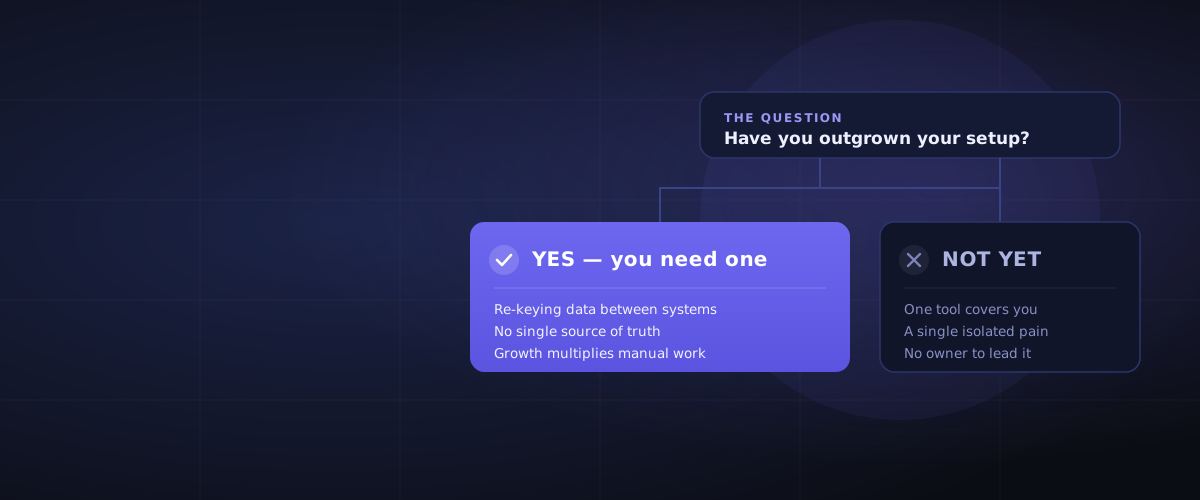
If you are deciding between staying on a smaller platform or moving up to Business Central, our guide on when a business actually needs an ERP covers the readiness signals.
For capabilities and fit, see the Dynamics 365 Business Central platform profile. Compare it head-to-head: Dynamics 365 Business Central vs Odoo, Dynamics 365 Business Central vs Zoho One, Dynamics 365 Business Central vs NetSuite, Dynamics 365 Business Central vs SAP Business One, Dynamics 365 Business Central vs Acumatica, Dynamics 365 Business Central vs Sage Intacct, Dynamics 365 Business Central vs Syspro.
Frequently Asked Questions
How much does Dynamics 365 Business Central cost?
Microsoft publishes BC list pricing: USD 70/user/month for Essentials, USD 100/user/month for Premium, and USD 8/user/month for Team Member. Realistic Year-1 totals for a 50-user mid-complexity deployment land in the USD 90K–180K range for Essentials with two ISV extensions, and USD 130K–250K for Premium with multiple ISVs and a manufacturing-led scope. The licence cost is honest; partner services and ISV extension licences typically dominate the total deal value.
Is Dynamics 365 Business Central good for manufacturing?
Business Central Premium handles light to moderate discrete manufacturing — BOMs, production orders, routings, capacity planning, basic shop floor data capture. It is competitive with NetSuite and stronger than Sage Intacct (which has no manufacturing). It is not a fit for complex process manufacturing (chemicals, food formulation with yield variance), repetitive high-volume operations, or shops needing deep MES integration. For those, Dynamics 365 Finance & Operations, SAP S/4HANA, Syspro, or a dedicated process-manufacturing ERP is a better answer.
Who owns Dynamics 365 Business Central?
Microsoft Corporation owns Dynamics 365 Business Central. The product descends from Microsoft Dynamics NAV, which Microsoft acquired from Danish vendor Navision A/S in 2002. Microsoft rebuilt the cloud edition and re-launched the product as Business Central in 2018 under the Dynamics 365 family umbrella. Microsoft sells BC exclusively through certified partners — there is no direct-from-Microsoft sales motion.
Can I implement Business Central myself?
Practically, no. Microsoft requires Business Central implementations to be delivered by a Microsoft partner. Even smaller deployments use a partner for the initial build, data migration, training, and cutover, then optionally bring administration in-house afterwards. This is a recurring pattern across partner-channel ERPs — you can run BC day-to-day with internal staff after go-live, but the implementation itself depends on certified expertise in AL development, data migration tooling, and ISV extension configuration.
How long does a Business Central implementation take?
Realistic timelines for a mid-market Business Central deployment run 3–9 months for single-entity, single-country implementations and 9–18 months for multi-entity, multi-country rollouts with several ISV extensions. SuiteSuccess-style pre-configured industry templates are less common in BC than in NetSuite, so implementation is more partner-bespoke. Our detailed view on how long ERP implementation takes covers the variables that compress or expand these ranges.
What is the difference between Business Central and Dynamics 365 Finance & Operations?
Business Central is Microsoft's mid-market product (75–500 employees, USD 10M–100M revenue). Finance & Operations (now branded as Dynamics 365 Finance and Dynamics 365 Supply Chain Management) is Microsoft's upper-mid-market and enterprise product (500+ employees, USD 100M+ revenue). F&O has deeper manufacturing, supply chain, and global compliance depth — and a correspondingly higher price point and longer implementation timeline. There is no upgrade path between BC and F&O; they are separate products with separate data models and customisation platforms.
What are the main Dynamics 365 Business Central alternatives?
The most common alternatives are NetSuite (cloud-native, Oracle-owned, stronger for services and subscriptions), Sage Intacct (finance-only, strong for services and non-profits, no inventory), Acumatica (consumption pricing, US/UK/AU concentration), SAP Business One (partner-only, stronger international localisation), Odoo Enterprise (cheaper, more flexible, less mature for complex compliance), and Dynamics 365 Finance & Operations (upper-mid-market and enterprise scale). For the head-to-head pattern, see our NetSuite vs Dynamics 365 deep dive.
How do Microsoft release waves affect Business Central customisations?
Microsoft pushes two major release waves per year (Spring and Autumn) plus monthly minor updates. Each release can affect ISV extensions and per-tenant AL extensions in your environment. Microsoft provides a preview environment so partners can test ISV combinations and custom code against the next wave before it lands in production. The discipline that matters: insist your partner runs every release wave through a regression test pack covering every ISV extension and per-tenant customisation, and that they document the test outcomes. Without this, customers discover breakage after the update.
How ERPLenz Can Help
This guide gives you the Dynamics 365 Business Central landscape: the pricing structure, the ISV extension reality, the trap matrix, the partner-due-diligence questions, and the demo discipline. What it does not tell you is whether Business Central is the right answer for your specific business — your industry, transaction volumes, Microsoft footprint, integration map, and operating complexity.
ERPLenz answers that question. Our 116-point diagnostic produces a ranked shortlist of three platforms calibrated to your business, with risk flags per platform, a five-year TCO modelled on your specific scale and geography, and (in the Deep Report) partner recommendations in your region. We are vendor-agnostic and partner-agnostic by design.
Begin your free ERP assessment →
Microsoft has thousands of Business Central partners. Most are competent, some are exceptional, a few are dangerous. ERPLenz exists to help mid-market buyers find the calibrated answer — and the right partner — before the SOW is signed.