ERP Integration With Existing Systems: What's Actually Possible
Dylan Coetzee · ERP Solution Architect & Founder · 12 min read · May 2026
Quick answer: ERP integration with existing systems is possible across virtually every modern platform, but capability varies dramatically. Entry-level tools rely on pre-built connectors and stall outside them. Mid-Market and Enterprise ERP — NetSuite, Microsoft Dynamics 365, SAP, Acumatica, Odoo — expose REST/SOAP APIs, webhooks, and middleware-friendly architectures. The real questions are who owns the integration after go-live, what happens when either system updates, and whether you need an iPaaS (Celigo, Boomi, MuleSoft, Workato, Make) to keep the stack maintainable.
Yes. Almost every modern ERP can integrate with other systems. But that answer is close to useless without the follow-ups: how well, at what cost, and who maintains it when something breaks?
ERP integration with existing systems is one of those questions that sounds straightforward in a vendor demo and turns into one of the most complex workstreams in an actual implementation. The platform you choose, the systems you need to connect, and the approach to building those connections all have long-term implications that go well beyond the initial build.
This guide covers what's realistically possible by tier, the architectural choices, the iPaaS question, and the specific questions that separate "we can do that" from "we have done that, repeatedly, for businesses like yours."
Why ERP Integration Capability Varies So Dramatically
The gap between what entry-level tools can integrate with and what a serious ERP platform can connect to is significant — and it matters because most businesses are not starting from a blank slate.
You have a payroll system (different in the US, UK, EU, Australia, India). A CRM. An eCommerce platform. A 3PL or warehouse management system. EDI trading partners. Payment gateways tied to regional rails — SEPA in the EU, ACH in the US, Faster Payments in the UK, NPP in Australia, UPI in India, PIX in Brazil. A tax engine — Avalara, Vertex, Sovos, or native. A business intelligence tool. Some of these have been running for years with data and workflows built on top of them that aren't going anywhere.
The ERP you choose needs to fit into that landscape, not exist in isolation from it. The CRM question deserves specific attention: one of the most common integration decisions is whether to connect a standalone CRM to the ERP, or use the ERP's built-in CRM module instead. See ERP vs CRM: what's the difference and do you need both? for that trade-off.
Entry-Level Tools (Micro and Small Business)
Platforms like Xero, QuickBooks Online, and Zoho Books — typical fits for Micro Business (<10 employees, <USD 1M revenue) and the lower end of Small Business (10–75 employees, USD 1M–10M revenue) — are built for simplicity. Their integration ecosystems reflect that.
They connect well to a curated set of popular tools — payment processors (Stripe, GoCardless, Razorpay), payroll systems (Gusto, Xero Payroll, KeyPay, Employment Hero, BambooHR), eCommerce platforms (Shopify, WooCommerce), and banks — through pre-built connectors. Within that curated set, integration is often straightforward and inexpensive.
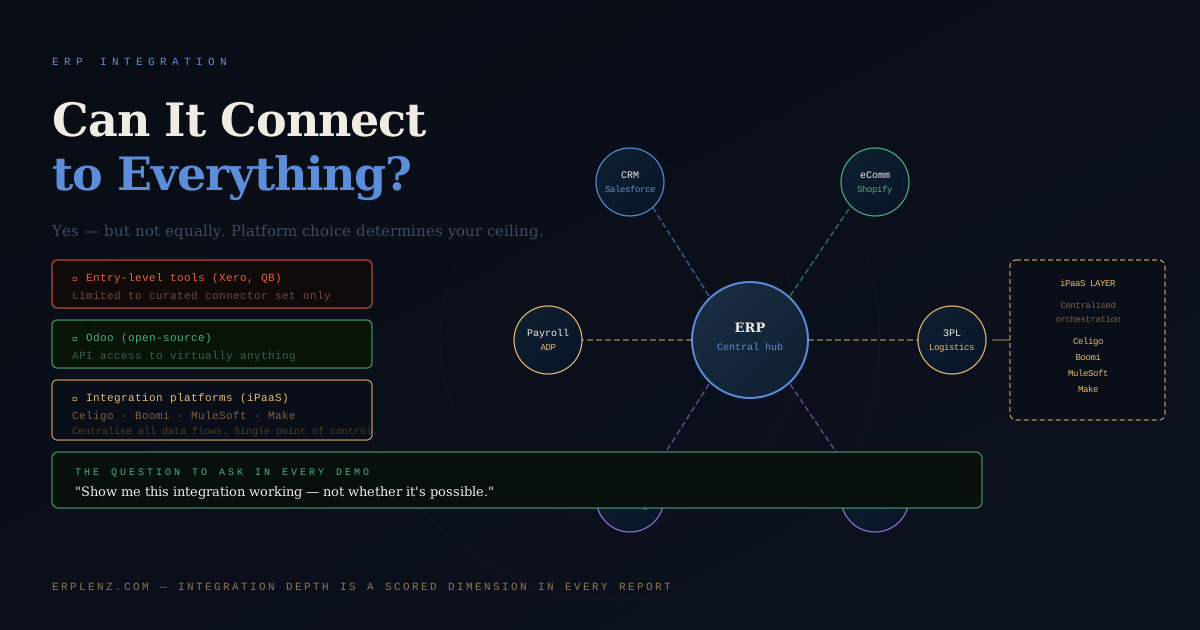
Outside it, you run into walls. These platforms were not designed for deep operational integration. They have limited or no native API capability for custom development, constrained webhook support, and no concept of a middleware layer. If the tool you need to integrate isn't in the connector marketplace, your options are limited to manual workarounds, third-party syncing tools, or a platform change.
This is fine when your integration needs match the platform's design intent. It becomes a problem when your business grows beyond it, and you find yourself running manual processes to bridge two systems that should be talking to each other automatically.
Mid-Market and Enterprise ERP Integration
Platforms like NetSuite, Microsoft Dynamics 365 Business Central, SAP Business One, Acumatica, Sage Intacct, and Syspro — Mid-Market territory (75–500 employees, USD 10M–100M revenue) — are built with integration as a core design principle. So are the Upper Mid-Market / Enterprise tier platforms: SAP S/4HANA, Oracle Fusion Cloud ERP, Microsoft Dynamics 365 F&O, JD Edwards, and Infor CloudSuite.
These platforms expose comprehensive REST or SOAP APIs, support webhook-based event triggers, have native integration frameworks (NetSuite SuiteTalk, Dynamics Dataverse, SAP BTP, Oracle Integration Cloud), and maintain large ecosystems of pre-built connectors to common business tools.
Integration possibilities at this tier are genuinely broad. The cost and complexity, however, scale accordingly. A bespoke API integration between NetSuite and a custom 3PL system is not a weekend project. It requires a developer who understands both data models, a testing environment, and an ongoing maintenance commitment as both platforms evolve.
Deployment model also affects integration flexibility. A self-hosted or on-premise ERP gives you direct database access and control over the integration environment. A SaaS platform means working through the vendor's API layer, which may have rate limits, restricted data access, or additional licensing for API calls. If integration depth matters to your decision, see cloud vs on-premise ERP for the deployment trade-offs.
Odoo: The Open-Source Advantage
Odoo deserves specific mention because it occupies a position no other platform in the mid-market quite matches: fully open-source, with an architecture that makes integration accessible at a cost that doesn't require enterprise-level budgets. ERPNext sits in similar territory at the Small Business end.
Because the source code is open and the module architecture is modular by design, Odoo can be integrated with virtually anything. There are no proprietary black boxes restricting what you can access or modify. A developer who understands Python and Odoo's ORM can build an integration with any system that exposes an API.
This openness is especially valuable for businesses with unusual or highly specific integration requirements. Where a proprietary ERP vendor might quote significant professional services fees to build a custom connector and charge annual maintenance on top, the same integration in Odoo can often be built once, owned entirely by the business, and maintained without vendor involvement.
The trade-off is that open-source integration requires genuine technical capability — internally or through a partner. Flexibility is an asset only if someone competent is using it. For broader open-source vs proprietary trade-offs, see netsuite vs odoo.
The Case for an Integration Platform (iPaaS)
As businesses accumulate more systems, point-to-point integrations become increasingly fragile. If System A talks to System B, System B talks to System C, and one updates its API, you have three integrations to audit and potentially rebuild. Multiply that across eight systems.
This is the architectural problem integration platforms — iPaaS (Integration Platform as a Service) — exist to solve.
Celigo, Boomi, MuleSoft, Workato, Make (formerly Integromat), and Zapier sit between your systems and manage data flows between them. Instead of each system talking directly to every other, each talks to the integration platform, which handles routing, transformation, error handling, and logging centrally.
Benefits:
- Centralised visibility: one place to monitor data flows and catch errors before they cascade
- Reduced rebuild cost when systems change: update in one place, not across multiple point-to-point connections
- Non-developer friendly: platforms like Celigo, Workato, and Make have visual workflow builders so operations or IT staff can build and maintain integrations without deep coding
- Pre-built connectors: most iPaaS platforms maintain libraries of pre-built connectors for common ERP, CRM, eCommerce, payroll, and logistics systems
- Regional readiness: native handling of multi-currency, regional banking rails, and locale-specific data formats
The consideration is cost. iPaaS platforms add a subscription layer to the stack — typically USD 500–5,000 per month depending on volume and complexity, with enterprise contracts (MuleSoft, Workato) running considerably higher. For a business with two or three integrations, point-to-point may be more economical. For a business with six or more systems that need to communicate, iPaaS often pays for itself in reduced maintenance and avoided errors.
ERP Integration Capability by Tier
| Tier / example platforms | Native API depth | Custom integration options | iPaaS friendliness | Typical integration cost profile |
|---|---|---|---|---|
| Micro Business (Xero, QuickBooks Online, Zoho Books) | Limited public API, rate-limited | Pre-built connectors only; custom is impractical | Light iPaaS only (Make, Zapier) | Low — connector marketplace pricing |
| Small Business (Odoo, ERPNext, Zoho One) | Full API; Odoo fully open-source | Genuinely open; bespoke is feasible | High | Low–moderate — high in-house leverage |
| Mid-Market (NetSuite, Dynamics 365 BC, SAP Business One, Acumatica, Sage Intacct, Syspro) | Comprehensive REST/SOAP, webhooks, event frameworks | Strong — partner-built or in-house | High; native iPaaS partnerships | Moderate–high — partner build costs apply |
| Upper Mid-Market / Enterprise (SAP S/4HANA, Oracle Fusion, Dynamics 365 F&O, Infor CloudSuite, JD Edwards) | Deep API surface, event-driven, integration layers (SAP BTP, OIC) | Extensive; often delivered via dedicated integration teams | High; iPaaS often mandatory at this scale | High — but absorbed by enterprise architecture budgets |
The Questions to Ask Before Any ERP Integration Is Built
These questions expose the gap between "yes we can integrate" and what integration actually costs and requires.
Is this a native integration or does it require middleware? Native means the ERP ships with a built-in connector to the other system, maintained by the vendor. Middleware means you're building a bridge between two systems — and someone owns its ongoing maintenance.
What happens when either system updates? APIs change. Platforms deprecate endpoints. A connector that worked in January may break in March. Who monitors this? Who fixes it? This question is never asked in the demo and always matters in production.
Who owns the integration post go-live? If the implementation partner built it and rolled off the project, and it breaks six months later, what is the support path? Get this in writing before go-live. For broader post-go-live ownership, see ERP ongoing support and maintenance.
What is the data sync frequency? Real-time sync, near-real-time (every few minutes), hourly batches, and daily batches are operationally different. An order management integration that syncs hourly means inventory levels are potentially an hour out of date. For most businesses that's fine. For high-volume retail with fast-moving stock, it isn't.
Can I see this specific integration demonstrated live, not described? Vendors who can demonstrate your required integrations live — in their system, connected to a test version of the other platform — have done it before. Vendors who describe it in slides haven't, or are planning to build it during your project.
How are regional variations handled? A US-centric integration design that ignores SEPA, Faster Payments, NPP, UPI, PIX, or regional tax engines (Avalara, Vertex, Sovos, plus native MTD, EU VAT, ZATCA, India GST, Brazilian NF-e) breaks the first time you onboard a non-US entity.
Integration Complexity as a Selection Criterion
Your integration requirements should be an explicit criterion in ERP selection, not an afterthought discovered during implementation.
Before evaluating any platform, map every system currently in use, document which need to exchange data with the new ERP, what data flows in which direction, and how frequently. Bring that map into every vendor demo and ask specifically: show me how this integration works.
Vendors who can't demonstrate live integrations to your specific stack are vendors planning to build them during your project — at your expense. This is one of the clearest signals of where implementation cost will overrun the original quote. For how this feeds into broader risk, see why ERP implementations fail and how long does ERP implementation take.
Frequently Asked Questions
Can any ERP integrate with our existing systems?
Almost. Every modern ERP supports some form of integration, but capability varies enormously by tier. Entry-level tools (Xero, QuickBooks Online) handle pre-built connectors well but stall outside them. Mid-Market platforms (NetSuite, Microsoft Dynamics 365 Business Central, SAP Business One, Acumatica, Sage Intacct, Syspro) expose comprehensive APIs and middleware support. Upper Mid-Market and Enterprise platforms (SAP S/4HANA, Oracle Fusion, Dynamics 365 F&O) offer the deepest integration surfaces, including event-driven architectures and dedicated integration layers like SAP BTP and Oracle Integration Cloud.
What is iPaaS and do we need it?
iPaaS — Integration Platform as a Service — is middleware that sits between your business systems and manages data flows centrally. Celigo, Boomi, MuleSoft, Workato, Make, and Zapier are common options. You probably need iPaaS if you have six or more systems that need to talk to each other, multiple regional entities with varying integration requirements, or non-technical staff who need to build and maintain integrations. You can probably skip it for two or three simple point-to-point connections. Subscription cost typically runs USD 500–5,000 per month, with enterprise pricing significantly higher.
What's the difference between native ERP integration and middleware?
A native integration is a pre-built connector shipped and maintained by the ERP vendor or its ecosystem — for example, NetSuite's native connector to Salesforce. Middleware is a custom-built bridge between two systems, usually delivered by an implementation partner or via an iPaaS. Native integrations are cheaper to maintain and have clearer ownership. Middleware is more flexible but introduces a third party — the partner or iPaaS provider — into your support chain. Confirm in writing who owns the middleware after go-live.
How much does ERP integration cost?
For Mid-Market deployments, plan USD 10,000–80,000 per significant custom integration in build cost, plus 15–25 percent annual maintenance. Pre-built connectors cost USD 0–5,000 per year in subscription. iPaaS platforms layer USD 500–5,000 monthly. Upper Mid-Market and Enterprise integration programmes routinely run six figures and benefit from dedicated integration architects. The variable that drives cost most is whether you're connecting to common systems (cheap) or bespoke ones (expensive). See how much does ERP cost for full budgeting.
Should we replace our standalone CRM with the ERP's built-in CRM?
Sometimes, but not by default. ERP-native CRM modules (NetSuite CRM, Dynamics 365 Sales when bundled, Odoo CRM) work well for businesses with simple sales processes and tight order-to-cash workflows. Dedicated CRM platforms (Salesforce, HubSpot, Pipedrive) offer richer pipeline management, marketing automation, and sales analytics. The right answer depends on which workflow is more complex in your business. ERP vs CRM: what's the difference and do you need both? walks through the decision.
What happens to ERP integrations when one of the systems updates?
APIs evolve, endpoints get deprecated, authentication mechanisms change. A working integration can break with no warning when either side updates. Native connectors are usually updated by the vendor; middleware and custom integrations are not. The ownership question — who monitors API changes, who tests the integration after vendor updates, who fixes it when it breaks — needs to be answered before go-live, in writing, with a named accountable party. Without that, integration outages become disputes.
How do we handle ERP integration across multiple regions?
Multi-region integration requires native handling of regional payment rails (SEPA in the EU, ACH in the US, Faster Payments in the UK, NPP in Australia, UPI in India, PIX in Brazil), regional tax engines (Avalara, Vertex, Sovos, or native MTD/EU VAT/AU GST/India GST/ZATCA), and locale-specific data formats. Some ERP platforms have stronger regional coverage than others — NetSuite OneWorld, SAP, and Oracle are strong at global. Acumatica and Dynamics 365 are strong in their core regions and need partner extensions elsewhere. Plan for regional payroll separately — it's almost never bundled cleanly.
How do we evaluate an ERP vendor's integration capability?
Demand live demonstrations of integrations to your specific stack, not slide descriptions. Ask for reference customers running the same integrations in production. Probe data sync frequency, error handling, monitoring, and update management. Get written commitments on post-go-live ownership and what happens when either system updates. Ask which integrations are native, which require middleware, and which would need bespoke development. Vendors who answer these confidently and specifically have done this work before. Vendors who deflect haven't.
How ERPLenz Surfaces Integration Risk
Integration depth is a scored dimension in the ERPLenz assessment. Your existing tech stack is captured in the diagnostic — the systems you currently use, the integrations you need on day one, and the ones you'll need as the business grows. Platforms are scored against your specific integration requirements, with a risk flag where a required integration would need custom development rather than a native connector.
For each shortlisted vendor, your report includes targeted questions about integration methodology for your specific stack — covering whether connectors are native or middleware-dependent, how upgrades are handled, and who owns the integration post go-live. These are the questions that surface the real integration cost before it appears as a surprise on the project invoice.
Systems where your critical integrations would require significant custom development — adding cost and risk that exceeds your budget — are filtered out before they reach your shortlist.
Know your integration risk before your implementation partner discovers it.
Integration is where ERP value either compounds or quietly leaks. ERPLenz exists to put the architecture decisions on the table while you still have options — not after the build invoice arrives.
On selection and fit
- ERP vs CRM: what's the difference and do you need both?
- Cloud vs on-premise ERP
- Which ERP is right for my business?
- Major ERP vendor vs niche ERP
On implementation and technical decisions