ERP Ongoing Support and Maintenance: Models, Costs and TCO After Go-Live
Dylan Coetzee · ERP Solution Architect & Founder · 14 min read · May 2026
Quick answer: ERP ongoing support and maintenance typically costs 15–25% of implementation spend per year, runs across three layers (vendor support, partner managed services, internal capability), and begins with hypercare for 60–120 days post go-live. The model you choose — vendor-direct, partner-managed, hybrid, or follow-the-sun for multi-country deployments — determines whether your ERP appreciates as a platform or quietly decays into shelfware. Plan the support model before go-live, not after.
Here is a mindset that kills ERP value more reliably than almost anything else: treating go-live as the finish line.
The implementation is done. The system is live. The project is closed. The budget is spent. And the business moves on — leaving a sophisticated, expensive piece of operational infrastructure to run itself, with no internal owner, no improvement roadmap, and no budget allocated for what comes next.
Six months later, staff are working around the system instead of in it. A year later, leadership is getting quotes for a new implementation. Three years later, somebody is asking why the ERP "never really worked."
It worked. The support didn't.
This is the article on what ERP ongoing support and maintenance actually looks like — across the hypercare period, the managed-services years, multi-country deployments and the long tail of upgrades, enhancements and renewals.
The Three Layers of ERP Support
A mature support model has three layers, and they are not interchangeable.
| Layer | Owned by | Scope | Typical cost basis |
|---|---|---|---|
| Vendor support | The software vendor | Product bugs, security patches, SaaS uptime, statutory updates | Bundled into licence (typically 18–22% of licence list per year for on-premise; included in SaaS subscription) |
| Partner / managed services | Implementation partner or third-party MSP | Configuration changes, customisation maintenance, integration support, training, advisory | USD 60k–250k+ per year depending on footprint and SLA |
| Internal capability | Your own people | Day-to-day adoption, role training, low-complexity changes, governance, roadmap | Salaries (0.25–2.0 FTE) |
Businesses that try to run on one layer alone — usually partner-only, occasionally vendor-only — pay more and get less. The high-performing model uses all three deliberately.
Hypercare: The First 60–120 Days After Go-Live
Hypercare is the elevated support period immediately after go-live, when the implementation partner stays close, response times are tight, and issues are triaged in near-real time. It is not optional. It is the difference between a stabilisation period of 6–8 weeks and one that drags into the second quarter.
A well-structured hypercare includes:
- A dedicated support channel with named partner consultants
- Tight SLAs (P1 within 1–2 hours, P2 within 4 hours, P3 same/next day)
- Daily standups for the first 2 weeks, weekly thereafter
- A formal issue log with weekly executive reporting
- A defined exit milestone (e.g. <5 P1/P2 tickets per week sustained for 3 consecutive weeks)
- A handover protocol from hypercare team to steady-state support
Hypercare typically runs 60 days for a Small Business deployment, 90 days for Mid-Market, and 120+ days for Upper Mid-Market and multi-country rollouts. Budget USD 30k–120k for hypercare on a Mid-Market deployment — separate from the steady-state support cost that follows.
Skipping hypercare to save money is the most consistently regretted decision in the post-go-live window. The cost of fixing problems after they have hardened into workarounds is many multiples of the cost of catching them in week three.
Vendor Support vs Partner Support: They Are Not the Same Thing
Buyers routinely conflate these. They are different products.
Vendor support comes from the software publisher — Oracle (NetSuite), Microsoft (Dynamics 365), SAP, Sage, Odoo SA, Acumatica, Frappe (ERPNext), Infor, etc. It covers the product itself: bugs, security, uptime, statutory and regulatory updates (MTD in the UK, ViDA and e-invoicing rollouts in the EU, GST e-invoicing in India, ZATCA Phase 2 in Saudi Arabia, CFDI in Mexico, peppol in ANZ and the EU). Vendor support does not cover your configuration, your customisations, your integrations or your users.
Partner support comes from the implementation partner or a specialist managed services provider. It covers everything in your tenant: configuration changes, customisation maintenance, integration troubleshooting, training, enhancement development, upgrade planning, regression testing, and the human escalation path you actually call when a user cannot post a journal.
When a P1 issue hits at 09:00 on a Monday, you are almost always calling the partner. The vendor is upstream from the problem. The partner is the one in the system with you. That hierarchy matters when you are negotiating the support contract — and it is why partner SLAs deserve more scrutiny than vendor SLAs.
For the broader case on partner vs vendor delivery and how it shapes the relationship, see ERP Implementation Partner vs Vendor Direct.
The Four Steady-State Support Models
Once hypercare ends, you need a support model. There are four credible options.
1. Vendor-direct support only
You buy the platform's standard support package and rely on internal capability for everything else. Works for: Small Business deployments on simple, well-fitted SaaS platforms with minimal customisation. Risk: nobody owns enhancements or the improvement roadmap.
2. Partner-managed services
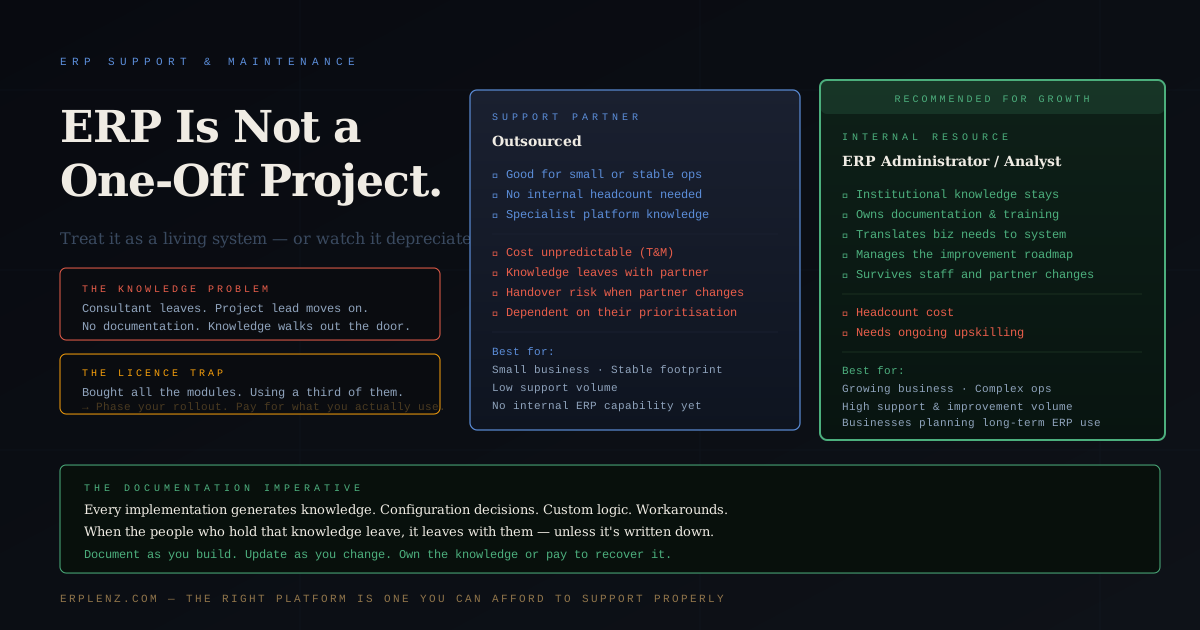
A retained partner provides ongoing support, manages upgrades, handles enhancements and acts as your day-to-day system custodian. Most common for Mid-Market. Costs USD 60k–250k+ per year depending on footprint and SLA. Best when the partner who implemented continues to provide strong service; risky when the relationship cools or pricing escalates.
3. Hybrid model
A retained partner handles complex work; an internal ERP administrator handles day-to-day. This is the highest-performing model for Mid-Market organisations planning sustained growth. Internal capability keeps adoption high and knowledge resident; the partner provides depth for upgrades, integrations and complex changes.
4. Full internal team with vendor support
For Upper Mid-Market and Enterprise, the internal team is large enough to handle most work, with vendor support for product issues and occasional partner involvement for specialist work. Highest fixed cost; lowest per-incident cost; best long-term knowledge retention.
| Model | Best for | Typical annual cost | Knowledge resident? |
|---|---|---|---|
| Vendor-direct only | Micro / Small Business, simple SaaS | USD 15k–40k | Low |
| Partner-managed | Mid-Market, complex deployment | USD 60k–250k | Medium |
| Hybrid (partner + internal) | Mid-Market growing into Upper Mid-Market | USD 100k–300k | High |
| Full internal | Upper Mid-Market / Enterprise | USD 400k+ | Very high |
Multi-Country Support: Follow-the-Sun, Regional Partners and Statutory Reality
If your business operates across regions, single-partner support stops working past a certain scale. Three patterns work in practice.
Follow-the-sun managed services. One global MSP with teams in multiple time zones (typically APAC, EMEA, Americas) provides 24/5 or 24/7 coverage. Works for SaaS platforms with consistent global product (NetSuite, Dynamics 365, SAP S/4HANA). Premium pricing but operationally simplest.
Regional partner network. A lead partner for the core build, plus regional partners in each major geography for local statutory work — UK MTD and Making Tax Digital, EU country-specific e-invoicing (Italy SDI, France PPF, Germany B2B e-invoicing rollout, Spain Verifactu), India GST e-invoicing and IRP integration, ZATCA in Saudi Arabia, peppol in ANZ. Cheaper than follow-the-sun, more coordination overhead.
Internal global capability with local advisory. A central internal ERP team handles most issues globally, with retained local advisors for tax, compliance and language. Suits Upper Mid-Market organisations with sufficient scale to justify the internal investment.
The decision depends on entity footprint, languages, statutory complexity per region and the maturity of your global IT function. Pick early — switching support models mid-deployment is expensive.
What Most Businesses Get Wrong About Licensing
One of the most consistent patterns in ERP procurement is the maximum-licence trap.
A business negotiates a contract. The vendor presents a tiered licensing structure — more users, more modules, more capability. The procurement team, anxious to "get the best value" and worried about returning to renegotiate later, buys the top tier. All the modules. All the users.
Go-live arrives. Half the licensed users never log in. Three-quarters of the modules are never configured. The business is paying for an entire platform and using a third of it.
The right approach is the inverse. Start with what you need for Phase 1. Pay for that. Use it fully. When Phase 2 is defined — when the business has operated on the system long enough to know which capability would add the most value — add licences and modules for that. This is not just financially more efficient; it produces better outcomes. Businesses that scale licences with adoption use a higher proportion of what they pay for, which means they realise more of the ROI they projected. See Big Bang, Phased, or Module-by-Module.
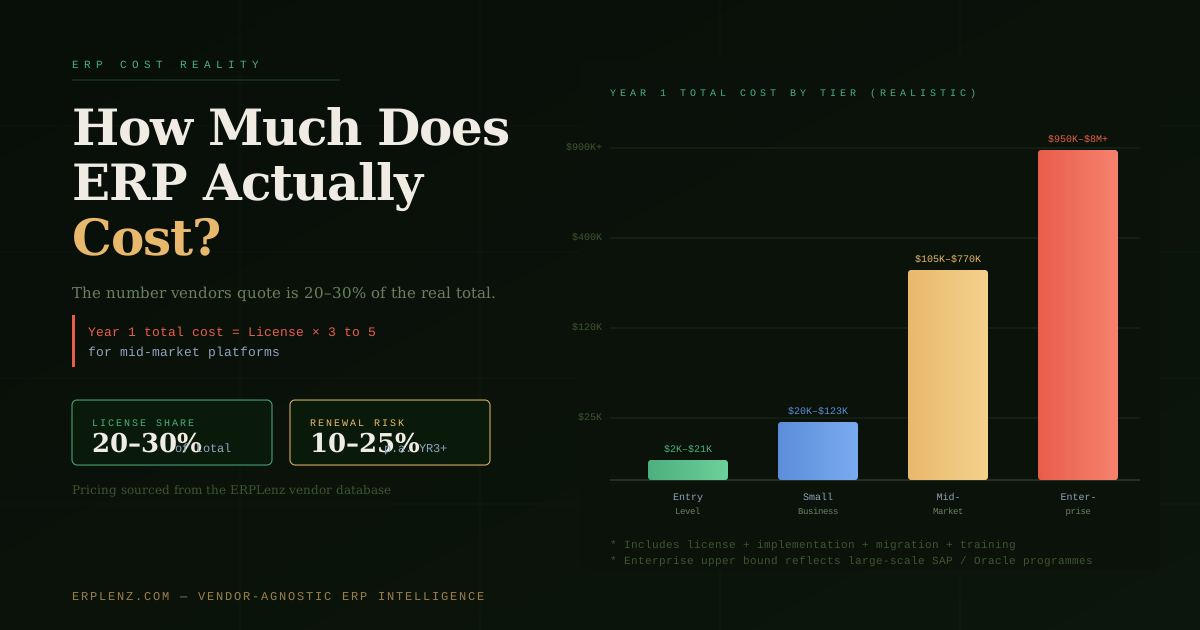
For the cost picture that runs alongside this — including how support pricing escalates and how to model it — see How Much Does ERP Actually Cost?.
The Knowledge Problem Nobody Plans For
This is the ERP support issue that gets the least attention and causes the most long-term damage.
Every ERP implementation generates knowledge. Configuration decisions and why they were made. Custom workflows and the business logic behind them. Integrations and how they were built. Workarounds and the edge cases they address. The consultants who built the system carry this knowledge. The internal project team accumulates it. Key users know things about how the system works that are not written anywhere.
Then people leave.
The implementation partner rolls off after go-live. The internal project lead moves on. The finance manager who knew why the revenue recognition rules were configured the way they were gets headhunted. The warehouse supervisor who understood the inventory adjustment logic retires.
What is left is a system that works — until something breaks or needs to change — with nobody who fully understands why it was built the way it was. The next support call goes to the implementation partner, who charges for the time to rediscover what they built three years ago. Or the business brings in a new partner, who starts with a system audit just to understand what they are inheriting.
This is not a technology problem. It is a documentation and knowledge management problem. And it is entirely preventable. It also features prominently in Why ERP Implementations Fail — not as a go-live failure, but as a slow post-launch degradation that accumulates invisibly until it becomes a replacement decision.
Every ERP implementation should produce living documentation. Not a 200-page system manual nobody reads — granular, role-specific process guides that explain what the system does, how it is configured, why key decisions were made, and what the edge cases are. Owned by a named internal person whose job it is to keep it current.
Upgrades: The Maintenance Work Nobody Budgets For
Every ERP vendor releases updates. Cloud SaaS vendors push them automatically (typically quarterly or semi-annually); on-premise and self-hosted deployments require planned upgrade cycles. In both cases, upgrades are not free — they require testing, especially if the system has been customised.
The discipline is simple: test before you trust. Every upgrade should go through a staging environment — an exact replica of production — before it touches live operations. A vendor update that breaks a custom workflow in staging is an inconvenience. The same update breaking it in production during peak trading is a crisis.
For SaaS, this means negotiating update timing with the vendor where possible, and maintaining a sandbox or staging tenant for regression testing. For self-hosted, it means planning an annual or semi-annual upgrade cadence with adequate test cycles.
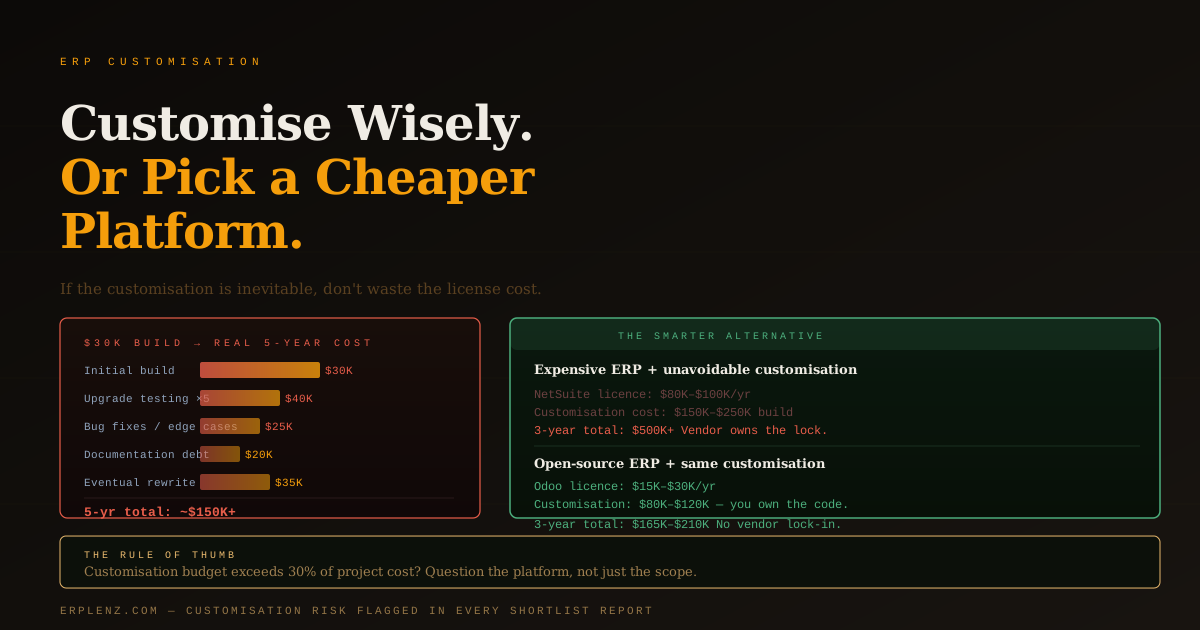
Customisations need particular attention at every upgrade. Each major upgrade should include a formal review of every customisation, tested against the new version before promotion. The full customisation maintenance picture is in ERP Customisation: How Much Is Advisable?.
The Improvement Roadmap: Why ERP Without It Depreciates
An ERP that is not improving is depreciating. The business it was implemented for in year one is not the same business in year three. Processes change. New products arrive. Regulations shift — new e-invoicing mandates, new tax rules, new reporting standards. Growth creates complexity that did not exist at go-live.
A support model that only responds to break-fix issues is a model for gradual obsolescence. The businesses that get sustained value from ERP treat it as a platform for continuous improvement — maintaining a prioritised roadmap of enhancements, allocating annual budget for ongoing development, and running regular reviews of what the system should do better.
This does not require large investment. A quarterly review of the ERP backlog, a modest annual enhancement budget (typically 5–10% of implementation cost), and an internal owner who understands both the system and the business is enough to keep the platform relevant and adoption high.
The businesses that eventually replace their ERP — not because the platform is wrong, but because it "no longer meets our needs" — almost universally stopped investing in improvement years before the replacement decision. For how to measure whether your ERP is delivering value over time, see How to Measure ERP Success and ROI.
The Questions to Ask Every Vendor and Partner About Support
Support terms and upgrade models vary enormously and are rarely front-and-centre in the sales process. Ask before you sign:
- What is the standard support SLA — response time, resolution time, escalation path for P1/P2/P3?
- How are major version upgrades handled — automatic, scheduled, or customer-controlled?
- Is a staging or sandbox environment included, or charged separately?
- What does the post-go-live hypercare period look like — duration, named resources, cost?
- For customisations: who tests and rebuilds them when upgrades break them, and at what rate?
- For multi-country deployments: do you provide regional support, or is it routed through a single global team?
- What is the price escalation clause in the support agreement — and is there a cap?
- What does a typical long-term engagement look like for a business our size — partner-managed, vendor-direct, hybrid?
A vendor or partner who answers with specific SLAs and documented processes has a mature support model. Vagueness about escalation paths and upgrade management is telling you something important about how the relationship will feel after go-live.
Frequently Asked Questions
How much does ERP ongoing support cost per year?
For a Mid-Market deployment, expect annual ongoing support and maintenance of 15–25% of implementation spend. Concretely: USD 60k–250k+ per year for partner-managed services, plus vendor support (bundled in SaaS subscription or 18–22% of licence for on-premise), plus internal cost (0.25–2.0 FTE depending on size). Upper Mid-Market and multi-country deployments push this higher because of regional partners, statutory complexity and 24/5 or 24/7 SLAs. Small Business deployments on simple SaaS platforms can sit well below this range.
What is hypercare in an ERP project?
Hypercare is the elevated support period immediately after go-live, when the implementation partner stays close with tight SLAs, daily standups and rapid issue triage. It typically runs 60–120 days depending on deployment size. It is separate from steady-state support and is budgeted separately — usually USD 30k–120k on a Mid-Market deployment. Skipping or shortening hypercare is one of the most consistently regretted decisions in the post-go-live window.
Vendor support or partner support — which do I need?
Both. Vendor support covers the product itself: bugs, security, uptime, statutory updates. Partner support covers everything in your tenant: configuration, customisation, integrations, training, enhancements, the human escalation path. When a P1 hits, you are almost always calling the partner. Vendor support alone is rarely sufficient for a Mid-Market deployment; partner support without vendor support means you cannot escalate product-level issues. Buy both, and define the boundary between them in writing.
How does multi-country ERP support work?
Three patterns: (1) follow-the-sun managed services from a single global MSP with regional teams; (2) a lead partner plus regional partners for local statutory work (MTD, EU e-invoicing, India GST, ZATCA, peppol); (3) internal global capability with retained local advisors. The right answer depends on entity footprint, language coverage, statutory complexity per region and the maturity of your global IT function. Pick the model before rollout — switching mid-implementation is expensive.
Should we build internal ERP capability or rely on a partner?
For Mid-Market and above, build internal capability. A partner-only model accumulates external dependency and external cost; every routine change generates a billable hour. A hybrid model — retained partner for complex work, internal ERP administrator for day-to-day — produces the best long-term outcomes. The internal owner keeps documentation current, trains new staff, identifies adoption gaps, and translates business requirements into system changes. The return on that role is often invisible short-term and substantial long-term.
How do ERP upgrades work and what do they cost?
Cloud SaaS vendors push 2–4 releases per year, automatically. On-premise and self-hosted platforms typically run major upgrades annually. In both cases, customised systems require regression testing on every release. Budget annual upgrade testing at USD 15k–80k for a Mid-Market deployment with moderate customisation, more for heavily customised systems. SaaS upgrades feel "free" but the regression cost is real — and largely sits with you, not the vendor.
What is ERP managed services and is it worth it?
ERP managed services is a retained engagement where a partner or specialist MSP provides ongoing support, upgrade management, enhancement development, and serves as your day-to-day system custodian — usually for a fixed monthly or annual fee with defined SLAs. Worth it when your internal capability is light, your customisation footprint is non-trivial, or your deployment spans multiple geographies. Less suitable when you have strong internal capability or a simple SaaS deployment with minimal customisation.
How do we avoid the maximum-licence trap?
Buy what you need for Phase 1. Use it fully. Add modules and users as Phase 2, 3 and beyond come into focus. Negotiate the commercial terms upfront to lock in pricing for future expansion, but do not pre-pay for capability you cannot yet operate. Vendors will push for upfront commitment; the better lever is a contractual pricing schedule for expansion, not pre-purchased shelfware.
How ERPLenz Helps You Plan Real Support Costs
The ERPLenz assessment accounts for ongoing support and maintenance when evaluating total cost of ownership — not just the implementation cost. Platforms are scored in part on their support ecosystem: regional partner availability, vendor-direct support quality, and how much routine administration requires partner involvement versus internal capability.
Open-source platforms like Odoo and ERPNext, which allow full internal administration without vendor dependency, score differently on this dimension than proprietary SaaS platforms where basic configuration changes may require billable partner time. Your report reflects this distinction explicitly — so you see the long-term support cost picture, not just the implementation quote.
Budget filtering applies to the full five-year cost model: if a platform's realistic total cost of ownership — licence, implementation, customisation, integration, hypercare and ongoing support — exceeds your budget, it does not reach your shortlist.
Get your free ERP budget reality check →
The right platform for your business is the one you can afford to support properly — not just implement once.
ERPLenz is built by consultants who have lived the post-go-live years on NetSuite, SAP, Odoo, Dynamics 365 and ERPNext. Most of what determines whether an ERP succeeds happens after the implementation partner has packed up — which is precisely why support models belong in the selection conversation, not the renewal conversation.
Earlier in the journey
- Which ERP Is Right for My Business?
- How Much Does ERP Actually Cost?
- How Long Does ERP Implementation Actually Take?
- Big Bang, Phased, or Module-by-Module?
- ERP Implementation Partner vs Vendor Direct
Related technical decisions